NatureScot's InformedDECISION™
A fully integrated platform that brings the benefits of artificial intelligence and automation to the consultation and decision-making process.
What is InformedDECISION™ and who should use it?
NatureScot is working with Informed Solutions to apply new technology to our casework service. The result is a new product called InformedDECISION™.
Any applicant who requests our advice for a statutory or pre-application consultation (including public bodies looking for SSSI advice and local authorities for Local Development Plans), and all those seeking SSSI Consent. This includes (but is not limited to) all Local Planning Authorities, a range of Government departments and agencies (SEPA, Scottish Forestry, Energy Consents, Transport Scotland, Marine Directorate Licencing Operations), any SSSI owners/occupiers/agents, and any developers or private organisations who work on behalf of any of the aforementioned organisations.
We are not yet using it for post-application interactions (please continue to use email).
We are using InformedDECISION™ to ensure our responses are faster and more consistent.
How do I access InformedDECISION™ for my consultation?
Please follow this link to access to make your application. Please answer the questions and provide the information requested and we will respond. Guidance is available further down this web page. There is also a helpdesk in the platform – see the green "get in touch" button.
Do I need training to use it?
We are offering a one-off training session for Local Development Plan Consultations on Wednesday 22nd July at 15.30-16.30 on Teams. It will be recorded and made available at the foot of this webpage shortly after it is held.
Join: https://teams.microsoft.com/meet/311630340222954?p=cXsEf1bsTCLWQrfxPn
Meeting ID: 311 630 340 222 954
Passcode: 5ES6gt2k
Training sessions were offered in the first four months after launch in 2025. There is guidance and FAQs further down this web page as well as a short video at the bottom of the page. If you have any queries not met by those, please use the helpdesk in the platform – see the green "get in touch" button.
Guidance
Applicant Guidance
Making an application to consult NatureScot through InformedDECISION
- Open the InformedDECISION website.
- Choose one of the following options:
- a. SSSI Consent
- b. Statutory Consultation
- c. Pre-application consultation
- d. Local Development Plan
- Confirm who you are – please select the relevant option listed, or the relevant option if you are working on behalf of an organisation
- a. The platform will follow a different set of questions for each of the options listed above
2a – SSSI Consent
- Tell us where the proposal is please either upload a shapefile, or draw on the map (using one of the options to find it fast, or navigate as you would on other online mapping facilities)
- Select the relevant option for whether you are the owner/occupier
- Give us details of the proposal in summary (free text).
- Upload any relevant documents
- Select the relevant option about who will carry out the operations
- Enter the dates the operations will take place between (if there are suspensions, please make sure you use the first start and the last end dates)
- Select the relevant option about management agreement/plan, then planning consent
There are two things that can happen here:
a. You are filtered out and told you do not need to consult NatureScot
- If you would like a copy of that decision for your records, please enter your email address.
- If you would like to contact us, click the “contact NatureScot” button. The platform saves all your information thus far and allows you to get in touch with us. If you feel you have been incorrectly filtered out, use this option to progress through to your case being reviewed by NatureScot.
b. You are pushed to the next part of the process that allows your case to be filtered in
- Review all your answers for accuracy
- Click continue
- Review the protected areas that could be impacted. Go back through your application to give more information if necessary.
- Provide us your contact details
- Click Submit
- You will then get an email confirming your answers/submission
2b – Statutory Consultation
- Select the relevant option for the reason you are applying to us
- Select the relevant option for the development type (these will vary depending on who you are; there may be more than one set of options)
- Select the relevant option on the EIA question
- Tell us where the proposal is - please either upload a shapefile or draw on the map (using one of the options to find it fast, or navigate as you would on other online mapping facilities)
- There are two things that can happen here:
- You are filtered out and told you do not need to consult NatureScot
- If you would like a copy of that decision for your records, please enter your email address.
- If you would like to contact us, click the “contact NatureScot” button. The platform saves all your information thus far and allows you to get in touch with us. If you feel you have been incorrectly filtered out, use this option to progress through to your case being reviewed by NatureScot
- You are pushed to the next part of the process that allows your case to be filtered in
- You are filtered out and told you do not need to consult NatureScot
- Enter the name of the proposal and any reference (eg to a planning portal)
- Give us details of the proposal in summary (free text). If you have previously consulted NatureScot and know the name of the case officer, please add this here.
- Upload documents relevant to the proposal
- If you are a Local Planning Authority, please only upload documents not in the public domain. NatureScot case officers will download documents from your planning portal
- If you are from any other organisation, please upload relevant documents at this stage
- Tell us when you need a response by
- Give us your contact details
- Review all your answers for accuracy
- Click submit
- You will then get an email confirming your answers/submission
2c – Pre-application Consultation (including SSSI advice for public bodies)
- Select the relevant option about whether you have consulted NatureScot before
- If yes, enter the case ID and click continue
- If no, you are pushed to the next stage
- Select the reason for consulting NatureScot
- Tell us where your proposal applies
- If the whole of Scotland, you are pushed to the next stage
- If a specific geographical location, please either upload a shapefile or draw on the map (using one of the options to find it fast, or navigate as you would on other online mapping facilities)
- Select the relevant option about connectivity with protected sites
- Review the information about the protected sites your proposal could affect
- Either “save and return later” OR “continue”
- Give us details of the proposal in summary (free text).
- Upload any relevant documents
- Tell us the expected dates
- Provide your contact details
- Review your answers for accuracy
- Click submit
- You will then get an email confirming your answers/submission
The pre-application consultation process is slightly different for public bodies seeking pre-application SSSI advice (SSSI Section 12 Applications), but not substantially. The questions will vary, but the main elements are the same.
2d - Local Development Plan Consultation (LDP)
43. Select which stage you are applying for (Local Planning Authorities use stages 1-3, DPEA use stage 4):
- Stage 1- select this option if you are requesting data in support of evidence gathering, you are consulting us on topic papers, or an Evidence Report
- Stage 2 – select this option if you are sending us site assessments for our input or if you have draft policies or sections for the Proposed Plan
- Stage 3 – select this option for consultation on the Proposed Plan (if you are using a consultation portal you will be able to share the URL)
- Stage 4 – select this option if sending a Further Information Request as part of Examination process
Case Submission process
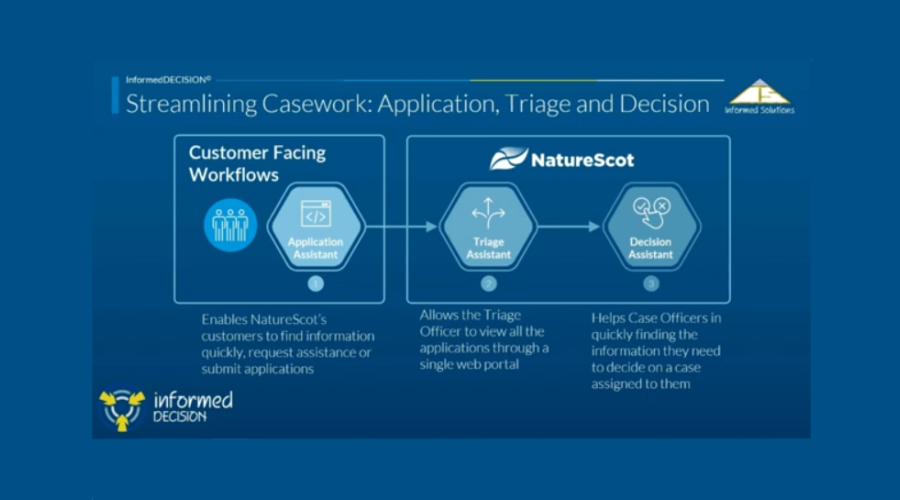
Your case will appear in our Triage Assistant and be reviewed by a triage officer, with the exception of LDP cases that are assigned straight to the relevant planning advisor. They may assess it and pass it to a case officer. That case officer will be in touch with any queries and then their response, within your timescales (or to agree another timescale). The triage officer may also assess it and decide it does not meet our thresholds for comment and so will provide you with an appropriate response, usually within 24 hours.
Adding documents later
If you need to add a further document after you have submitted your application to us, please submit a helpdesk ticket (green button in the bottom right of the platform), citing the case ID, and attaching the document.
If you are a local planning authority we will see any new documents appear automatically on your planning portal. If you wish to submit redacted or confidential documents please follow the process in the previous paragraph.
Protected Areas included in mapping function
SSSI, SPA, SAC, Ramsar, World Heritage Site, NSA, NNRs, Wild Land, Carbon Rich Soils (Class 1 and 2), Oceanic Bryophytes (Category A/B/D watercourses), Geological Conservation Review sites, Priority Marine Features.
Drawing in the mapping function
There is an option to draw a polygon shape in the mapping function for every consultation type apart from LDPs, where it is not needed. This does not have to be at a fine resolution/level of detail but should be sufficient for case officers to determine connectivity and impact on protected areas.
In our experience all larger applications will have a shapefile to upload, or one can be requested from the developer.
Shapefiles must be polygons. They cannot be polygon-Z (3D) because this isn’t compatible with InformedDECISION. They can be in a zip file. The zip file must include:
SHP - geometry
SHX - index
DBF - database attributes
PRJ - co-ordinates
CPG - character coding
SBN/SBX - spatial index
HTML - metadata
Add text
Local Planning Authorities don’t need to draw/upload a shapefile. Adding the correct planning reference will automatically pull the spatial information from Uniform.
Frequently Asked Questions
A longer list of Frequently Asked Questions is available.
The Artificial Intelligence element of the platform is used by our case officers to present them with a range of similar cases. This shortens the time we spend searching manually and increases the consistency of our response. It is a large language model, not generative AI: there is a human making the decision. Here is a statement on how the AI is used.
When you make an application we use the terms “filtering in” and “filtering out” to refer to whether your case is referred to a case officer or the platform confirms you do not need to consult us. To understand the logic behind this please look at the blue segment called "do you need to consult us or not?"
The platform is light on broadband usage, so those in areas of poor connectivity shouldn’t experience any difficulties. However, we have a paper process for those without access to a computer or smartphone (and for business continuity). Please contact the InformedDECISION helpdesk (green button within the platform) or your local NatureScot office if you wish to use this application route.
The platform has been piloted from June 2023-January 2025. NatureScot’s South Operations region piloted, along with five local authorities, Scottish Forestry’s South Conservancy, two private consultancies, and all SSSI owner/occupiers in the area.
The pilot proved that we could provide a more efficient, consistent, and timely service with benefits to both NatureScot and our partners. The average application time was 11 minutes.
Pilot feedback from applicants included:
Usual familiar interface, clearly laid out and pretty straightforward
Clearly set out and follows a logical order. The forms are easy to use
It gave me a degree of comfort. This is much better than old fashioned consultation, giving me continuous feedback and enabling further comment.
I like this tool and the ability to really zoom in so that you can define the area exactly
Further information
For any enquiries about the change, please contact [email protected]
View our InformedDECISION Privacy Statement.
If you have any technical difficulties with InformedDECISION™, please use the helpdesk app within the platform itself (the “get in touch” button at the bottom right of the screen).
Buffer Information
Information about the buffers we place around different development types and different features. Please note that we take a precautionary approach to setting those buffers and they will be regularly updated in light of practical experience and new research.
InformedDECISION™ uses buffers around both development types and features in protected areas. These work visibly (development type) and in the background (feature type) within the platform itself.
A full list of the buffer distances is accessed by the case officer.
The distances have been determined by existing research and specialists, and quality assured by case officers and their managers. They will be refined over time and updated several times a year.
Information in this document should be read in conjunction with our standing advice and guidance.
Types of Protected Area covered by InformedDECISION™
- SSSI
- SPA
- SAC
- Ramsar
- World Heritage Site
- NSA
- Wild Land
- Carbon Rich Soils (Class 1 and 2)
- Oceanic Bryophytes (Category A/B/D watercourses)
- Priority Marine Features (11 most sensitive)
- Geological Conservation Review sites
Feature Buffers (applicable to protected areas)
20km
- All geese (except bean geese)
- Osprey
- Peregrine
- Whooper Swan (breeding)
- Most breeding bird assemblages
15km
- Geomorphological features (coastal, fluvial, marine)
13.5km
- Red-throated diver
11km
- Golden Plover
10km
- Black-throated diver
- Hen harrier
- Chough
- Bean Geese
9km
- Golden Eagle
5km
- Merlin
- Natterjack Toad
- Short Eared Owl
- Whooper Swan (non-breeding)
3km
- Dunlin, Greenshank, Lapwing, Pochard, Ptarmigan, Snow bunding, Spotted Crake, Teal, Tufted Duck, Turnstone, Water Rail
- Some breeding bird assemblages
2km
- Bearded tit, Black Grouse, Curlew, Dotterel, Fair Isle Wren,
- Coastal Geomorphology
- Reptile assemblages
1km
- Capercaillie, Great Crested Newt,
- Amphibian assemblages
500m
- Peatlands
- Fish
- Lochs and river features
- Some birds
- Fungi assemblages
- Some geological features
- Common Seal
- Grey Seal
- Harbour porpoise
- Most seabirds
350-450m
- Grebe, Great Northern Diver, Common Tern, Shelduck, Scaup
300m
- Woodlands
- Grasslands
- Uplands
- Plants
- Insects
- Some birds
250m or under
- Corncrake
- Most geological features
- Some birds
- Bottlenose Dolphins
Buffer zones are not applied to some species because we do not have any sites designated for them: White-tailed Sea Eagle.
Development Buffers (applicable to relevant development types)
All figures are in metres and mimic the options available in the platform
SSSI Consent
- All SSSIs have a boundary of 250m around them if you are applying as a public body/equivalent. If you are applying as a private owner/occupier (or agent on behalf of them) then there is no buffer – only works on the site itself are relevant.
Local Planning Authority
- New build residential development - 250
- New industrial, commercial & retail buildings - 250
- New agricultural buildings - 250
- New tourism or leisure development - 250
- Conversion or alteration of an existing building - 250
- Wind farm (includes meteorological masts & discharge of conditions) - 15,000
- Telecommunications masts and related development - 150
- Public road related - 150
- Peatland restoration - 500
- Aquaculture - 5,000
- Access tracks - 250
- Harbour/pier maintenance/alteration - 500
- Other - 250
Forestry
- Woodland creation - 50
- Long Term Forest Plan (LTFP) or Land Management Plan (LMP) - 50
- Amendment to woodland creation - 50
- Amendment to LTFP or LMP - 50
- Tree felling/thinning permission - 50
- Emergency works - 50
- Other – 50
Energy Consents
- Wind Farm - 15000
- Battery Energy Storage System - 250
- Hybrid Renewables - 15000
- Hydro - 250
- Solar - 250
- Overhead Powerlines (Transmission and Distribution) – 15000
CAR Licence
Water development type
- Discharges and Storage - 2000
- Abstraction activities - 2000
- Impoundment activities - 2000
- Engineering activities - 2000
Waste management development type
- Transporting waste - 500
- Storage and treatment of waste - 500
- Composting - 500
- Anaerobic digestion - 500
- Recovery of waste - 500
- Incineration and co-incineration - filter in automatically
- Landfill - 500
Industrial development type
- Gasification, liquification and refining: petrol vapour recovery - 500
- Mineral activities - filter in automatically
- Coating activities, printing and textiles - 500
- Timber activities - 500
- Treatment of animal and vegetable matter and food industries - 10000
- Solvents installations - 500
- Anaerobic digestion (AD) non-waste - 500
- Carbon capture - 500
- Generators of electricity aggregating to 1MWth or more - filter in automatically
Transport
- Preliminary Assessment - 1000
- Option assessment - 1000
- Detailed assessment - 1000
- Procurement - 1000
- Construction - 1000
- Operation and maintenance - 1000
- Harbour order - 500
Marine Licence
(EEZ= European Economic Zone) (all figures given in metres)
- Macroalgal farms - Entire EEZ
- Cables and pipelines - Entire EEZ
- Decommissioning of works - Entire EEZ
- Deposit of any substance or object - Entire EEZ
- Dredging - 5000
- Dredging and deposit of dredged material - 5000
- Dye release - 1000
- Emergency exemption - Entire EEZ
- Marine construction project - Entire EEZ
- Marine renewable energy project - Entire EEZ
- Moorings/Pontoons - 500
- Other - Entire EEZ
- Pre-disposal sediment sampling - 250
- Removal of any substance or object - Entire EEZ
- Removal/deposit of UXO charged - Entire EEZ
- Scientific/geotechnical investigation - Entire EEZ
- Sediment Sampling - Entire EEZ
- Underwater acoustic monitoring devices - Entire EEZ
Updates
October 2025 – CAR Licence – Industrial Development Type – treatment of animal and vegetable matter and food industries – move from 500m to 10000m
March 2026 – Forestry cases – all development types – changing from 250m to 50m
Help
Please use the helpdesk within InformedDECISION (the green button that floats at the bottom right).
Do you need to consult us or not?
In line with our National Interest Guidance, NatureScot have designed InformedDECISION™ to help applicants understand whether or not they are required to consult us.
- We use the term “filtered in” when your application will make its way through the platform to a case officer.
- We use the term “filtered out” when your application does not meet certain criteria and the platform will confirm you do not need to consult us, or do not need to consult us directly because another regulator who you need to consult (e.g. planning authority) will consult us on your behalf.
- Note that for SSSI consents, being told that you do not need to consult us does not infer consent.
Pre-applications
Screening and Scoping requests in connection with a development proposal that requires an EIA will always be filtered in. Otherwise, the same criteria as with statutory consultations applies.
Statutory Consultations
If your proposed development takes place on a protected area (or within the buffer zone around that area), then your application will be filtered in.
AND/OR
If your proposed development has an Environmental Impact Assessment, then your application will be filtered in.
Almost all Marine licence applications will be filtered in.
Electricity Act (S36/37) will always be filtered in.
Port & Harbour authority consultations will always be filtered in.
Aquaculture consultations will always be filtered in.
If your proposed development does not have an EIA, and does not interact with a protected site, then your application will be filtered out. You will then get confirmation that you do not need to consult us.
If you disagree with that conclusion, there is a button saying “contact NatureScot”. All the information you have put into the platform thus far is saved and your application will make its way through the platform to a case officer.
This may be the conclusion the platform comes to for the exceptional situation where our standing advice on protected animals doesn’t cover your application. If you get confirmation you do not need to consult us, but you feel that your application meets the exception, then please use the button saying “contact NatureScot”.
Non-Statutory Consultations
InformedDECISION™ holds geospatial information about World Heritage Sites, Oceanic Bryophytes (categories A/B/D), Carbon rich soil (class 1 and 2, also known as Priority Peatlands), Geological Conservation Review sites, Priority Marine Features and Wild Land areas. If your application interacts with one of these, then it will be filtered in.
It does not hold geospatial information about protected species which are covered by our standing advice – links can be found on the How and when to consult NatureScot Checklist page. If your application relates to one of these, then your application will be filtered out.
SSSI Consents
Operations within SSSIs that require consent (listed as Operations Requiring Consent for all sites on Sitelink) will be filtered in, and your application will be passed to the relevant case officer. If the operation is not within the SSSI, but within agreed buffers for the site’s protected features, your application will be filtered in, but the case officer may determine that no consent is required.
Consents that are currently active but about to expire – the start date must be after the end date of the previous consent.
Your answers to any of these questions within the application process:
Are any of these proposed operations included in your Scottish Rural Development Programme contract?
- yes – filtered out
- no – filtered in
Are any of the proposed operations covered by an active management agreement, land management order, or species control order?
- yes – filtered out
- no – filtered in
The operation requires consent from another regulatory body (which must have first consulted NatureScot)
- yes – filtered out
- no – filtered in
The operation is to be carried out under planning consent
- yes – filtered out
- no – filtered in
More information on SSSI consents.
Use of Artificial Intelligence
This solution uses AI technology to support NatureScot staff in the management and processing of statutory consultations, SSSI consents and development casework.
The technology is used to make it easier and faster for NatureScot staff to locate historical information regarding Protected Areas, previous cases and responses. We also use generated case summaries, which update whenever new information is added to a case.
We use generative AI to search through our guidance and/or all casework documents. This has narrow parameters, clear citations from the source material, and case officer judgement is still applied.
The technology is not used in any way to make decisions regarding the outcomes of applications. All decisions are made by NatureScot staff, with the same level of quality assurance and expert review cycles as have always been in place.
There is an entry on the Scottish Government’s AI Register.
As with all other NatureScot IT systems, we undertake a quarterly assurance exercise to review data quality, user access levels, staff role changes, data protection, business continuity controls (for which there is a separate, annually updated, plan), and business continuity.
This statement has been produced between NatureScot’s InformedDECISION team and Informed Solutions. February 2026.
Details of new functionality
Functionality:
Release date 24 June 2026
- Local Development Plan consultations now come through the platform
Release date 7 May 2026
- We now accept statutory consultations for marine energy
- Shortened the proposal name field
- Added new questions relevant and specific to wind turbine proposals for Energy Consents Unit and Local Planning Authorities
- Added helptext for the proposal name
- Added a hyperlink to our statutory response timescales next to the date field
- Added helptext about the map rendering
- SSSI Consent question changes clarifying “proposed” operations for SRDP and existing management agreements
- No-comment response email titles shortened in response to applicant feedback that they were cumbersome
Release date 19 March 2026
- Integration with Local Authority Mapping
- Document upload size increased from 50mb to 100mb
- Visual differentiation between protected areas that are within the polygon applicants draw and those shown because they are within the buffer zone of a protected area
- Save and return function takes applicants back to the page they left (rather than to the start or end of the application)
- On the check your answers page, a list of all uploaded documents are now shown
- A copy of the answers (except the map) are now shown in the confirmation emails
- All aquaculture and harbour cases are now automatically routed to NatureScot (ie you won’t be told there’s no need to consult us)
Release date 13 November 2025
- Marine Licence case type added to the platform
Release date: 8 September 2025
- The name of proposal and reference number now included in the confirmation and response emails.
- Eastings and northings are now on the mapping page to aid those local authorities who use them to centre the map location faster than before.
- When applicants are filtered out, the content of the email they are sent will exactly match the content on the page they're presented with in the platform.
- For clarity, changing the order of bullet points on the first page of the application assistant to match what you see on the second page.
- For clarity, changing from "pre-application for development" to "pre-application" on the landing page (the one where you choose what you want to do).
- For clarity, the SSSI Consent as a private owner/occupier will include (in the list) "researcher".
- For clarity, where we ask for previous application ID, clarifying that we mean previous NatureScot application ID (it is an optional field).
- Expanding the Who Are You list to clarify Local Planning Authority or National Park (previously NPs weren't mentioned, but were in the list on the following page).
- Adding text on submission page to state that we may be in touch if we wish further information.
Release date: 19 June 2025
Energy Consents Unit applications – update to the text when applications are filtered out (was incorrectly showing the text associated with SSSI Consents rather than Statutory Consultations).
Release Date: 29 April 2025
Removed a 250m spatial buffer around SSSIs for private owner/occupier applicants because it was over-precautionary and resulted in those type of applicants having to consult us when they didn't need to.
Release Date: 2 April 2025
Changed wording on filtered-out message for statutory consultations to clarify "impact on a protected area".
Release date: 13 March 2025
Helptext on map page – Updated the help text on the map page to aid users in drawing their polygons because some users found it difficult.
Helptext on description of proposal page – Added helptext to encourage users to be brief and not to use formatting because was an accessibility issue for case officers.
Duration
02:36
A guidance video for any applicant that needs to apply to NatureScot for advice or consent (through pre-application, statutory consultation, or SSSI Consent).
Last updated: