NatureScot InformedDECISION™ - Frequently Asked Questions (FAQs)
Help and Guidance
Return to InformedDECISION™ web page for all Guidance. Guidance includes:
- Written Guidance for applicants
- Video guidance for applicants
- Helpdesk app embedded in the platform
Are there cases that shouldn’t go through InformedDECISION™?
All statutory casework should including Local Development Plan consultations from Local Authorities and DPEA; all SSSI consents (emergency ones after the fact); and all pre-applications.
Fisheries derogation cases are not in scope. In line with our standing advice and guidance and if you have a query that doesn’t fall under the areas listed in this web page, then you may continue to email as before.
I'm from a local authority in England/Northern Ireland – can I use InformedDECISION?
No – please submit your application by email to the relevant NatureScot area – [email protected], [email protected], [email protected]. We get very few applications from outside of Scotland so the platform will not be adapted for these exceptions to the rule.
Where do I access InformedDECISION™?
I’m not sure if I need pre-application or statutory consultation
If you want to ask NatureScot for advice on a development proposal before an application is made to a planning authority or other regulator, please submit a pre-application inquiry (this includes EIA screening and scoping requests). If you are a regulator such as a planning authority, and you want to consult NatureScot on an application for permission that you have received, please submit a statutory consultation.
What if you have applied to us before on this case (but it’s a different element)?
It would be really helpful to us if you’d put the name of the NatureScot case officer in the description field of your application. If you have any other unique details (eg your previous case reference or application ID) that will help us tie together the cases.
SSSI applications with suspensions – how do I handle the dates?
Put in the first start and the last end date, then describe the suspensions in the description box.
What happens if I have an expiring SSSI consent?
Please tick the "no" button when asked if you have an existing SSSI consent. Even though you do, you're applying for a new one. We will make improvements to this process in the coming year so it's clearer and so that extending an expiring consent is easier than applying for a new one.
Is there a definition of “emergency” consents?
Yes. It’s not exhaustive, but examples are on the SSSIs Consent web page.
What kind of shapefiles are accepted?
We accept polygons, lines, and point-based shapefiles. We do not accept polygonZ files (3d). Check first that the zip file has:
SHP – geometry
SHX – index
DBF - database attributes
PRJ - co-ordinates
CPG - character coding
SBN/SBX - spatial index
HTML – metadata
If I don’t have a shapefile, how precise does the map drawing need to be?
It doesn’t have to be absolutely precise, but it shouldn’t be like sticking a plaster over the map.
What happens if I draw a line rather than a polygon in the mapping?
You will be unlikely to be able to just draw a line – the minimum is three points. But if for some reason you manage it, you’ll be filtered out and told you don’t have to consult us. Before you hit the submit button you can navigate back to the map to alter it. If you realise after you’ve submitted, you can contact us using the obvious button.
What layers are included in the mapping?
In addition to all the designations we’re responsible for (SSSI, SAC, SPA, Ramsar, NSA, World Heritage Sites), we also include Wild Land, Carbon Rich soils (class 1 and 2), Oceanic Bryophytes (watercourse categories A/B/D), GCR sites (Geological Conservation Review).
What if my documents are not electronic, eg: paper maps?
You will need to scan document(s) for submission. InformedDECISION™ offers the opportunity to draw on a map for the location of your proposal. It can be a bit fiddly on a mobile phone but still works okay.
NatureScot do not accept paper copies of information with the exception of landscape visualisations. Should these be required, please send to: NatureScot Landscape Advisers, Meadowbank House, 6th Floor South, 153 London Road, Edinburgh, EH8 7AU.
Can I save my application and return to it later?
Yes, you will be sent a link that you can use to return to their application. You will be asked to provide a 4-digit number that makes the link sent to you unique.
If you wish to save and return multiple times, you must choose a new 4-digit number each time.
You can save and return later at any point up to, but not including, the submit button. Once you have submitted, you can't return to your application. If you have further information to add, please submit a helpdesk request (green button in the bottom right of the web appliaction) with your case ID and we will upload the additional information. If you want to recall/delete your application, please do likewise.
How long does 'save and return' work for?
If you click 'save and return' you are asked for a four-digit pin code of your choice. You can return to your application up to 90 days after doing this.
If you are midway through an application and leave it open on your webpage (and don't turn your computer off), the platform will remember where you are in the workflow for 24 hours. After that, you'll have to restart. If you close the webpage/turn off your computer you'll have to restart.
InformedDECISION™ automatically filters out cases – what happens if I feel this isn’t right?
You can click the “contact NatureScot” button that appears on the filtered-out message screen. This saves all your information and pushes the case into our triage system.
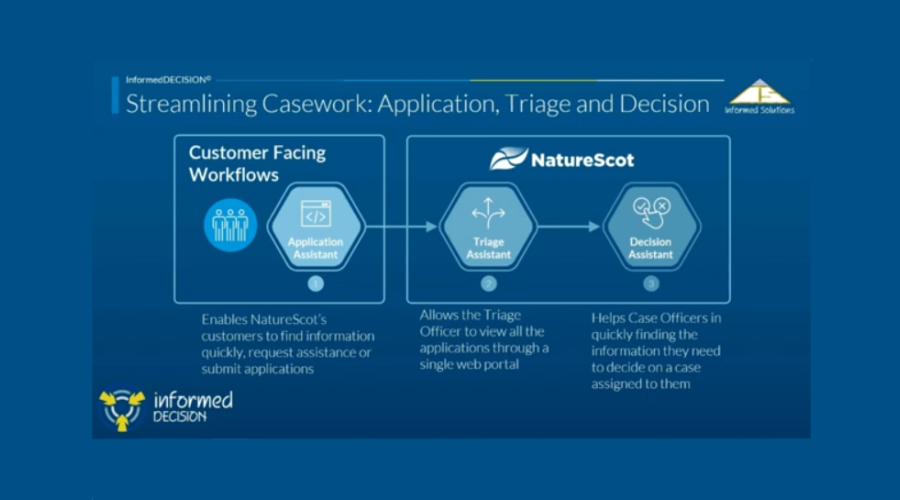
What happens to my case when it’s passed to NatureScot?
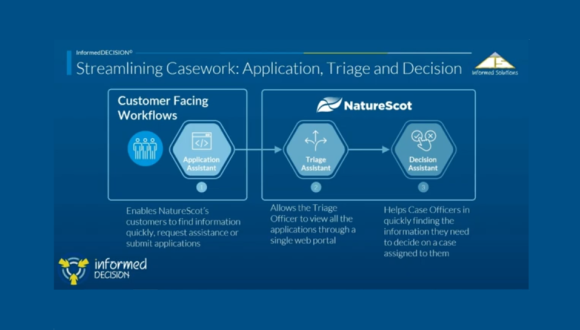
We have a triage system (one for South, one for West Central, and the three northern areas share one). This is staffed by experienced case officers (we call them triage officers for this part of the process) who will review your case and pass it to the relevant case officer, if we deem that we need to provide a bespoke response. They may also review the case and ascertain that it does not need a bespoke response. In those cases you will get one of a set of no-comment responses. For Local Development Plan consultations the case is assigned straight to a planning advisor, bypassing triage.
What if I want to withdraw an application or have made a mistake?
Please contact us through the Helpdesk – the green button that floats in the bottom right of InformedDECISION. We will arrange for information to be passed on to the case officer, or arrange for your application be deleted, as appropriate
Adding documents later
Please contact us through the Helpdesk – the green button that floats in the bottom right of InformedDECISION. You can upload documents there and they will be passed on to the case officer. Please state your InformedDECISION reference number and/or your own reference number, if that's already been provided
I can’t see the NatureScot logo on the emails
This is to do with your email settings – you should add the emails to your “safe sender” list, and the pictures will be downloaded automatically.
I would normally issue a notification to NatureScot long after advice has been given – how do I do that?
You’ll have a case officer/their email copied into the response we give – please contact them by email directly. They can upload your notification within the in-house side of InformedDECISION™ so it is associated with the case.
What if I experience technical difficulties?
Use the helpdesk app from the platform. It is operated by NatureScot colleagues who can contact Informed Solutions if there are any technical difficulties that we cannot resolve.
Our cyber security requirements are such that anyone using a browser from 2018 or before won't be able to use the platform. Please get in touch through the helpdesk (if available to you), or email [email protected].
Information Security
All information in InformedDECISION™ is held securely and processed only by those with a need to handle it for the purposes of giving advice on pre-application and statutory consultations, and for SSSI Consents. We would not release information to the public unless it was requested under Freedom of Information request, or other such legal instrument. We have a Data Protection Impact Assessment and Privacy Impact Assessment that are available upon request - email: [email protected].
Background
Where did InformedDECISION™ come from?
There were a pair of innovation funds run by Scottish Government. This platform was a proposal in the first (GovTech), which was later taken over by CivTech. This project went through an initial scoping phase with 6 contractors, later whittled down to two, then to one. That one is Informed Solutions.
Why the name?
It’s a brand name from the contractors, Informed Solutions, and is a trademark. That’s why it’s always written as one word with the latter part in capitals.
Was it piloted?
Yes. South Operations were the pilot area, with five local authorities (Fife, East Lothian, Falkirk, Scottish Borders and Dumfries and Galloway Councils), Scottish Forestry’s South Conservancy, two consultancies; and all SSSI owner/occupiers in the area. The pilot initially ran for 4 months, then was analysed. The result of that analysis eventually made it into a business case, which was approved by our Senior Leadership Team. At go-live, there was 18 months of pilot experience.
What type of applications did the pilot cover?
Three types of consultations were covered:
- Statutory consultations from Local Authorities and Scottish Forestry South Conservancy
- SSSI Consents
- Pre-application consultations from selected consultancies and the above local authorities
What’s in the next phase of development?
The latest updates are shown at the bottom of the NatureScot's InformedDECISION page.
In 2026 we are working direct connections with the portals for Energy Consents Unit, Marine Directorate’s Licencing Operations Team, Scottish Forestry, and SEPA. We aim to integrate further with Local Planning Authority portals.
Details of new functionality are shown in the relevant section on this page. Any suggestions for improvement are welcome and can be submitted via the feedback forms, which are embedded in the platform (top of the page) or via the Helpdesk (green button within InformedDECISION).
Last updated: