Guidance - Marine Recorder Online for contractors
Instructions for contractors on entering NatureScot marine benthic data to Marine Recorder Online.
Updated February 2026
Contents
- Introduction
- MRO Database Structure
- MRO Geometry
- How to structure NatureScot surveys into Marine Recorder Online
- Preparing and entering survey data
- Quality Assurance
- MEDIN Discovery Metadata
- Submitting MRO data to NatureScot
Introduction
The Marine Recorder Online (MRO) is an online application used to store and analyse marine benthic biological, sediment and morphology data.
This document sets out how to structure survey data in Marine Recorder Online in the NatureScot tenancy, and it should be used in conjunction with the MRO knowledge base available on the MRO website.
This document is a reference guide to support NatureScot Statement of Requirements and to aid project delivery, it should be consulted to assist data entry by NatureScot contractors, or those entering data under terms and conditions associated with Grant funded work.
NatureScot Marine Data Advisers can offer advice to aid data entry, requests for support should be made via the project Nominated officer. Within this document the Nominated Officer is defined as the individual identified within NatureScot as responsible to manage the delivery of the project and as main contact point for contractors; such as the project lead, project officer or grants manager. Please refer to the project documents for details of the person identified as the Nominated Officer.
How to access Marine Recorder Online
Marine Recorder Online can be accessed on the Marine Recorder Online website.
If you already have an account registered for the NatureScot tenancy, you can log in through the MRO website. If you do not already have an account this should be requested via the NatureScot Nominated Officer.
Marine Recorder Online Applications
Marine Recorder Online has two applications serving different purposes; one for entering and managing data, the other for accessing and downloading data.
Enter Data / Management Application
The management application (accessed using the ‘Enter Data’ button on the MRO website landing page) gives the user the ability to upload the data templates for data entry, enter data directly or manage data within MRO. This is the application you need to use when entering NatureScot data.
Access Data / Reporting Application
The reporting application (accessed using the ‘Access Data’ button on the MRO website landing page) gives access to data already in MRO; including all the entered data under the NatureScot custodianship and data published onto MRO from other custodians.
The reporting application gives access to the MRO Snapshots, a downloadable copy of who entire MRO database either for all the data under NatureScot custodianship or all public data.
Data protection
The provisions of the Privacy Notice for marine biological records processed by NatureScot and the Marine Recorder Privacy Notice are to be understood by any member of staff processing or entering data into Marine Recorder Online:
Every Contractor entering data into Marine Recorder Online must ensure all relevant people (including surveyors, sample analysis and determiners) are aware of how their personal data entered into Marine Recorder Online will be processed in line with these Privacy Notices.
MRO Database Structure
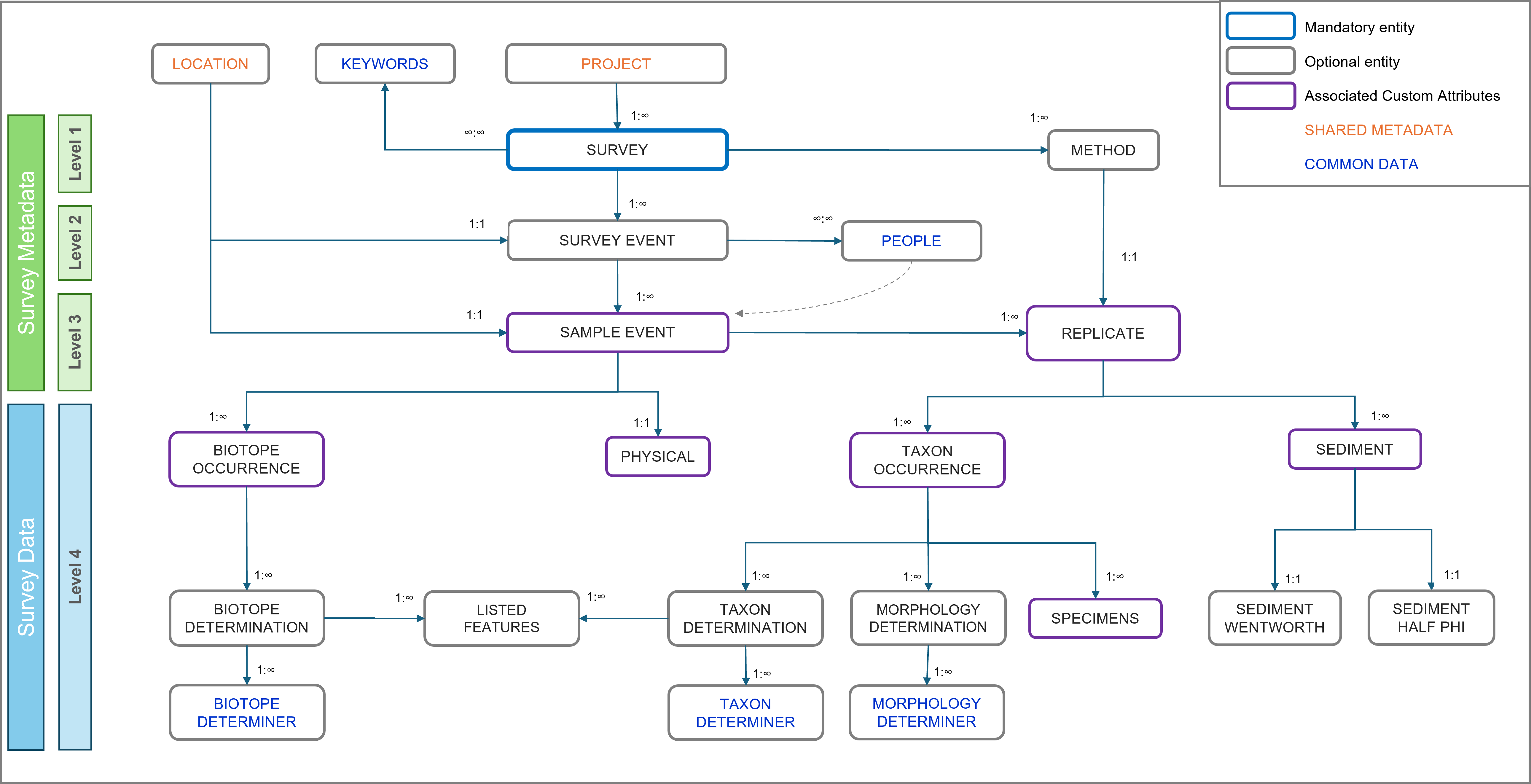
Marine Recorder Online has a hierarchical structure, designed to accommodate different types of data, collected using a wide range of survey protocols. Below is an overview of the structure of the database.
More details on the MRO database structure can be found in the MRO knowledge base (available on the MRO Data Entry website once logged in).
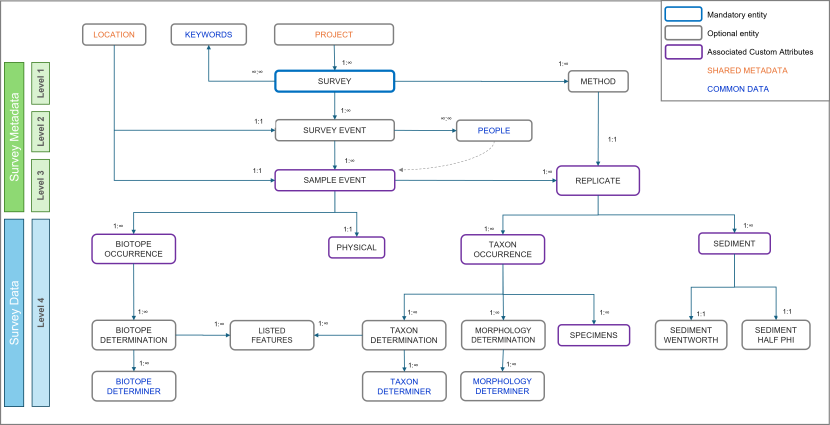
View a larger version of this image.
This overview diagram shows the database structure and entity relationships of Marine Recorder Online as detailed within the text within this guidance.
Once logged into the MRO Management Application (by clicking on the ‘Enter Data’ button and signing in), the Home page give you access to view and enter data for each of the MRO entities.
Definition: Within this document, each of the data entry items listed above are referred to as ‘entities’ – for example the Project entity or Survey Event entity. An entity name is shown as Bold when referred to within this document.
Shared metadata
Shared metadata information is entered and managed by NatureScot staff, therefore there is no requirement for contractors to enter or edit these data. However, the Locations associated with the survey will need to be entered into the Survey Events using the correct GUIDs, as advised by the Nominated Officer.
Project
The highest-level category under Shared Metadata, this provides functionality to link a survey to a single parent project; a project can have multiple related surveys. This allows grouping of surveys into projects to aid data management.
The allocation Projects is managed exclusively by NatureScot staff.
Location
The Location entity is a way to group Survey Events and Sample Events from across one or more Surveys where they share repeatedly surveyed geographic location or monitoring box. Locations have a type, a geometry and associated attributes that describe the general marine landscape, geology, salinity, wave, tidal and littoral regimes, but not specific measurements. Location entities should not be confused with the geometries associated with Survey Events and Sample Events.
The Location data are entered by the Delegate Editor (i.e. contractor) with specific guidance from NatureScot staff.
Survey metadata
Survey metadata consists of multiple levels which group the collected data into a survey dataset. The survey metadata consists of the Survey, Method, Survey Event, Sample Event and Replicate.
Names of personnel involved with the survey or analysis activity should not be used in any fields outside of the People entity; which relate to Personnel fields in Survey Event, Sample Event, Taxon Determination and Biotope Determination entities.
Survey (Level 1)
The Survey entity provides the ability to collate a group of records collected during specific survey activity; such as a series of data collection activities collected for a common purpose, at a given place, and with defined dates of data capture.
Survey is created and managed by the NatureScot Nominated Officer, then are delegated to contractors for completion of data entry. The information for the delegated Survey is likely to need further data entry and editing by the contractor.
Survey Event (Level 2 - child entity of Survey)
Survey Events are a mechanism for grouping relevant Sample Events; such as a discrete episode within a survey that has an identifiable geometry and date. Survey Events would typically be focused on a single type of data collection, for example a drop-down video run, or a grab sample or a dive transect.
The Survey Event data are entered by the Delegate Editor (i.e. contractor) and can be edited by NatureScot staff.
Method
A Method entity defines what sampling techniques were used during a survey. A method must be created for each sampling technique used within the survey for which data is being entered (for example one for drop-video and one for grab sampling). A record can be copies or cloned then used for another Survey, to save time with data entry.
Each Replicate record within a Sample Event must be associated with one of the defined Method records.
The Method data are entered by the Delegate Editor (i.e. contractor) and can be edited by NatureScot staff.
Sample event (Level 3 - child of Survey Event)
Data associated with a given sampling point, transect segment representing a single homogenous biotope, or an area specifically targeted as part of a Survey Event.
Sample Event data are entered by the Delegate Editor (i.e. contractor) and can be edited by NatureScot staff.
Replicate (Level 3 - child entity of Sample Event)
A Replicate describes a specific device deployment associated with a Sample Event, each Sample Event can have one or more associated Replicates. Sampling with different devices or methods at the same point location (i.e. core, dig-over, and quadrat) will produce a series of Replicates associated with the parent Sample Event. Sometimes device deployments are pooled into a single replicate, see details on how to structure data for different survey methods below.
The Replicate records do not have associated geometry data within the record, instead the geometry for a Replicate is held within the parent Sample Event, as a Point, Line or Polygon. There are additional entities such as Taxon occurrences and Sediment under Replicate are used in combination to assign biotope(s) to the parent Sample Event.
Replicate data are entered by the Delegate Editor (i.e. contractor) and can be edited by NatureScot staff.
Survey Data
Taxon Occurrence, Taxon Determination, Morphology Determination, Specimens, Sediment, Sediment Wentworth, Sediment Half Phi, Physical, Biotope Occurrence, Biotope Determination, and Listed Features (Level 4)
Each Sample Event and Replicate can have one or more Level 4 entries to represent the data collected and derived during survey. Each type of entity in Level 4 is designed to capture different types of data, as described below.
All level 4 entries are entered by the Delegate Editor (i.e. contractor) and can be edited by NatureScot staff.
Taxon Occurrence (child entity of Replicates)
A Replicate can have one or more Taxon Occurrences records. These are records detail the attributes relating to species (taxon) occurrence within a Replicate. Taxon Occurrence allows the recording of attributes including abundance, qualifiers (like colour, life-stage, sex), specimen retention for voucher collections, any further relevant notes.
Taxon Occurrences may require the use of Custom Attributes to enable the data to be entered appropriately, guidance is outlined in the project Statement of Requirements (SOR) or seek advice from the Nominated Officer.
Taxon Determination (child entity of Taxon occurrence)
Each Taxon Occurrence will normally have an associated Taxon Determination. Taxon determinations focus on the identification of the taxon recorded and may have a qualifier like sp., spp. or indet. etc. Information of the date of determination and the determiner are particularly important in ensuring the robustness of data.
Morphology Determination (child entity of Taxon occurrence)
Each Taxon Occurrence can also have either one or both of a Taxon Determination or a Morphology Determination, depending on the identification determination.
Morphology Determinations should be used to record where a taxonomic determination alone provides insufficient information or when no suitable pure taxonomic term is assignable, for example Maerl indet, Diatoms, or where NatureScot require use of CATAMI or SPONGMOR morphologies.
Specimens (child entity Taxon occurrence)
A Taxon Occurrence can have a child Specimens record. Specimen is used to record various metrics associated with specific metrics for individual specimens collected during the survey, for example shell length, seagrass blade width, or maerl dimensions. Completion of Specimens is required only where metrics of individual specimens within the taxon occurrence have been recorded.
Specimens may require the use of Custom Attributes to enable the data to be entered appropriately, guidance is outlined in the project Statement of Requirements (SOR) or seek advice from the Nominated Officer.
Sediment (child entity of Replicates)
A Replicate can have one or more associated Sediment Data records and should be used where sediment sampling and analysis has taken place.
Sediment Half Phi and Sediment Wentworth (child entities of Sediment)
Each Sediment record can also have one child one Sediment Half Phi Data and or one Sediment Wentworth Data record (usually where sediment analysis has taken place only one of these will be used). Refer to the SOR or seek guidance from the Nominated Officer for details of which entity to use.
Physical (child entity of Sample Event)
The Physical entity enables the recording the physical metrics for an associated Sample Event. Physical is distinct from Sediment, where detailed sediment sampling and analysis has been undertaken. The attributes that are recorded for a Physical record represent specific observations or measurements made during survey.
Physical (child entity of Sample Event)
The Physical entity enables the recording the physical metrics for an associated Sample Event. Physical is distinct from Sediment, where detailed sediment sampling and analysis has been undertaken. The attributes that are recorded for a Physical record represent specific observations or measurements made during survey.
Physical may require the use of Custom Attributes to enable the data to be entered appropriately, guidance is outlined in the project Statement of Requirements (SOR) or seek advice from the Nominated Officer.
The Physical metrics may form part of the evidence that supports the Biotope Occurrences and Determinations assigned to the parent Sample Event.
Biotope Occurrence (child entity of Sample Event)
Biotope Occurrence records detail the nature of the biotope(s) associated with a parent Sample Event. The Biotope Occurrence includes relevant description as to whether the biotope makes up the whole sample, the percentage of the sample the biotope represents, whether the biotope is the dominant biotope.
Biotope Occurrence may require the use of Custom Attributes to enable the data to be entered appropriately, guidance is outlined in the project Statement of Requirements (SOR) or seek advice from the Nominated Officer.
Biotope Determination (child entity of Biotope Occurrence)
Biotope Determination records detail the specific biotope associated with each parent biotope occurrence. The Biotope Determination enables the certainty of the identification to be recorded, the classification used, the biotope code, the determination method, whether it was auto determined, quality control details, further relevant notes, whether determined under NMBAQC protocols, determination date and details of determiner.
Biotope determinations should always be based on available evidence, e.g. taxa abundances, sediment or substrate associated with the parent Sample Event and Replicates.
Listed Features (child entity of Biotope Determination and Taxon Determination)
NatureScot expect Listed Feature functionality to be used to propose records of PMFs, MPA Search features, Representative features (observed within specific protected areas only); Protected features (observed within specific protected areas only), OSPAR Threatened and Declining, and Annex I habitats. Listed features are assigned to the reliant Biotope Determination and Taxon Determination records.
Proposed Listed features will be reviewed by the NatureScot staff.
Custom Attributes
MRO custom attributes have been designed to allow attribute data to be entered for Sample Event, Replicate, Physical, Sediment, Taxon Occurrence and Specimen entities. NatureScot have set up specific custom attributes where they are needed for entering specific survey data.
Instructions on which custom attributes to be used are outlined in the Statement of Requirements for the contracted project, with further guidance from the Nominated Officer.
MRO Geometry
Spatial data are required for the Location, Survey Event and Sample Event records, as a single point, line or polygon. Marine Recorder Online uses Well-known text (WKT) to represent vector geometry, such as Points, Lines or Polygons. Each WKT consists of a series of coordinates signifying the vertices which make up the geometry shape. Other WKT geometry types are NOT currently supported in MRO.
In MRO, the coordinates are longitude (x) and latitude (y) as decimal degrees recorded in WGS84 (EPSG: 4326). Data must be converted to this format before being entered in WKT format. Note carefully that MRO requires the x (longitude) value to be expressed before the y (latitude) value in each coordinate pair.
MRO has a tool to generate WKTs from a given series of coordinates, or WKTs can be generated and exported from GIS software or other tools. The maximum length of a WKT for a spatial attribute in MRO is 100,000 characters. The maximum length of a WKT while using the import templates (as excel spreadsheets) is 32,767 characters. WKT’s between these two thresholds can be entered directly into the UI. Usage of WKTs is to be restricted to Point, LineString and Polygon types. NatureScot request that only 2D WKTs are used for entering geometry data (3D (i.e. z dimension) is technically possible but for now should not be used.
Within the MRO website, the green ‘Generate Geometry’ button and enter the X (longitude) and Y (latitude) coordinates which will generate the WKT code for the Point geometry, for example. The coordinates for longitude (x) and latitude (y) are decimal degrees recorded in WGS84 (EPSG: 4326).
To generate WKTs for the import templates ArcGIS, QGIS, ArcPro or other geographic information software can be used to generate WKTs using shapefiles of the raw data. For example; in ArcPro use the Calculate Field tool for a text field to calculate the WKT code using this Python expression: !Shape!.wkt
Point
A single point represented by an x coordinate and y coordinate.
Format: POINT (-3.800975 57.700234)
Line
A straight line is set of two x and y coordinates representing the start and end position of the line, separated by a comma.
Format: LINESTRING (-3.93834 57.642461, -3.776249 57.691672)
A multipart line is a series of x and y coordinates representing a start, each point of direction changes and the end position of the line, separated by a comma.
Format: LINESTRING (-3.822252 57.73544, -3.673897 57.732507, -3.684886 57.805749, -3.459607 57.805749)
Polygon
A series of four or more x and y coordinate pairs representing by the vertices of a triangle, quadrilateral or more complex polygon as per the following examples:
Triangle
Defined by 4 coordinate pairs to represent a box area, with the final coordinate pair matches the first coordinate pair to close the polygon.
Format: POLYGON ((-3.839437 57.685799, -3.674598 57.685799, -3.674598 57.754007, -3.839437 57.685799))
Quadrilateral
defined by 5 coordinate pairs to represent a box area, with the final coordinate pair matches the first coordinate pair to close the polygon.
Format: POLYGON ((-3.839437 57.685799, -3.674598 57.685799, -3.674598 57.754007, -3.839437 57.754007, -3.839437 57.685799))
More complex polygons
A series of six or more x and y coordinate pairs to represent the boundary of a polygon area, with the final coordinate pair matches the first coordinate pair to close the polygon.
Format: POLYGON ((-3.629802 57.903174, -3.756178 57.876896, -3.695737 57.800871, -3.58035 57.768659, -3.421006 57.809651, -3.421006 57.897336, -3.629802 57.903174))
Polygon types not allowed
- Polygons with a hole(s)
- Multi-part polygons
Geometry which comprise of multi-part polygons (separate polygons as a single WKT) or polygons with holes should not be used when entering data on behalf of NatureScot.
The functionality to support polygons with holes within MRO is under development.
How to structure NatureScot surveys into Marine Recorder Online
Survey methodology and sampling technique influence the way that data is structured into Marine Recorder Online to ensure appropriate partition of survey data. This document outlines how NatureScot data should be structures for species survey proposed and sampling methods.
Below the structure of survey data is outlined, with details where there is distinction for a SCM survey in respect to the monitoring Location.
Monitoring Locations
During Site Condition Monitoring (SCM) survey, a defined monitoring area or monitoring transect is targeted within a Marine Protected Area or an area with Protected Marine Features. As monitoring is likely to be repeated, Location(s) should be established in MRO as Location type: ‘Monitoring site’ so they can be re-used in repeat survey and associated with Survey Events from the repeat surveys.
Drop-down camera
The Survey Event will split into separate Sample Events where biotopes are observed to change, each using a Linestring WKT based on vessel track. Where positional data from vessel track is available for the drop-video deployment: A single Survey Event will represent each drop-video deployment using a complex Linestring WKT based on vessel track.
Any layback corrections are to be applied before entry to MRO. A layback correction is an offset applied to the surface GPS position and the seabed location of the sampling instruments, for example if the GPS is positioned at the ship bridge but the instruments are deployed straight down from the ship stern, the different in location can be corrected for.
The geometry type will be Line with the coordinate pairs will be digital Longitude and digital Latitude in WGS 84.
Monitoring Locations
Each Survey Event will be associated with a Location, and the Location Type will always be “Monitoring site”. The Location geometry should be a bounding box represented by a polygon WKT, as “WGS 84 Geometry (Polygon)”.
It is acceptable for multiple drop-video deployments to share the same ‘Monitoring site’ Location (i.e. they do not necessarily need individual Locations). Where repeat monitoring has taken place NatureScot will specify which Locations should be used for Survey Events, seek advice from the Nominated Officer.
Each Sample Event will normally have a single Biotope Occurrence and Biotope Determination is based on evidence from the observed taxa, abundances and substratum (in the Physical entity) and any other relevant information, with the ‘Whole Record’ box ticked. Where a particular portion of the drop-video track is represented by a fine resolution mosaic of habitats, it is unrealistic to create separate Sample Events. The Sample Event representing that portion of the drop-video will have Biotope Occurrence entries for each.

Grab sample
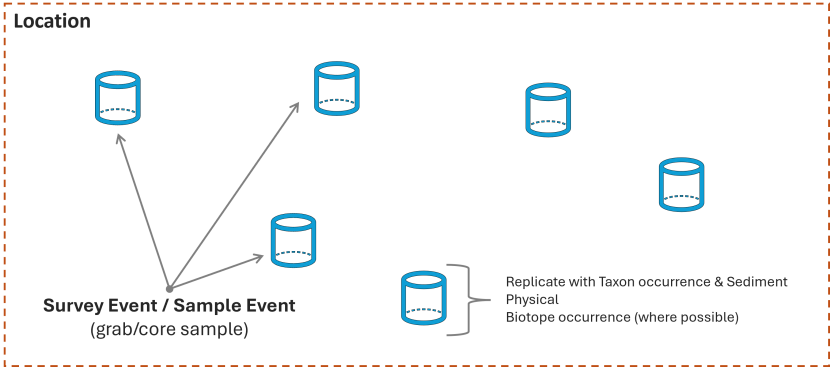
Grab device deployments are assigned to individual Survey Events, each containing one Sample Event. These Survey Events and Sample Events share an identical point geometry type; Point WKT with the geometry value as “WGS 84 Geometry (Point)”.
Each Sample Event will contain a single Replicate, with associated Taxon Occurrence(s), Morphology, and Sediment records determined from the grab sample analysis. Each Survey Event should also have a Biotope Occurrence and Biotope Determination where possible to determine from the sample data.
Details of which sediment analysis (Wentworth or Half Pi) and therefore Sediment child entity to be used is outlined in the project Specification of Requirements or seek advice from the Nominated Officer.
Monitoring Location
Each Survey Event/Sample Event must be associated with a Location with the Location Type as “Monitoring site”. There is no requirement to establish a Location for each grab. The Location geometry should be a bounding box represented by a polygon WKT, as “WGS 84 Geometry (Polygon)”
Subtidal dive transect
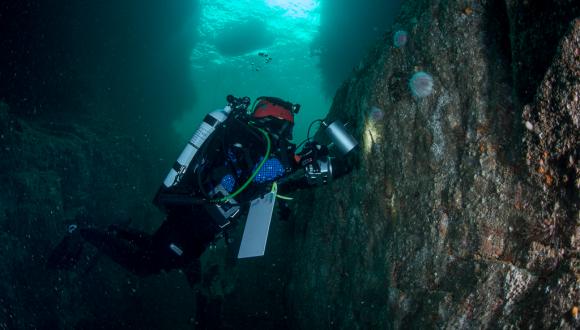
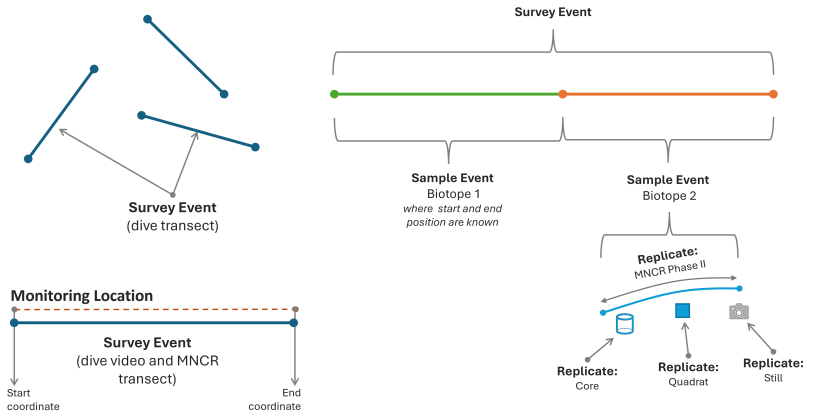
During a subtidal dive survey data can be collected using a range of methods, including video along a dive transect, core sampling, MNCR Phase II survey and quadrats. Typically, the dive transects are along a 25m straight line. Data is collected along one or more transects, each treated as a separate Survey Event with an associated Location.
Each Survey Event will have a Linestring WKT, as “WGS 84 Geometry (Line)”, based on the start and end coordinate for the transect.
Monitoring Location
Each Survey Event must be associated with a specific Location, with the Location Type as “Monitoring site”. The Location must be represented by a Linestring WKT geometry based on the start and end coordinate of the transect, as a “WGS 84 Geometry (Line)”. This is particularly important as it allows recording of the Start and End coordinates which is essential for repeat monitoring visits.
The Linestring WKT for the Location should be the same (or very similar) to the geometry of the Survey Event.
The dive transects are split into a series of Sample Events representing changes of habitat type. The number and distribution of Survey Events and Sample Events within the transect may change between repeat monitoring surveys as the habitats can be dynamic. The details below outline the data structure needed for the most complicated scenario and may not be applicable to all situations. For example, the transect may only cover a single biotope or there may not be data available to determine where one biotope stats and another begins. In these examples, a single Sample Event would be used to describe the entire Transect with all other data sitting under this single Sample Event.
Each Sample Event will have a Linestring WKT geometry, as a “WGS 84 Geometry (Line)”, based on the start and end coordinate of the transect section representing a single habitat type. The exception is where a transect is down vertical rock face or in a sea cave where GPS is only available for the entrance, the Sample Event may be defined by a Point WKT geometry: “WGS 84 Geometry (Point)”. In these cases, insert suitable notes to describe where the habitat is located within the Sample Event.
Make every effort possible to ascertain coordinates for changes in observed biotopes but recording the positions of biotope start and end positions along a subtidal transect can be challenging. NatureScot use techniques such as the surface team recording surface marker buoy position when it is pulled down by the diver to mark a point of habitat change or measured distances down transect from a known start point, allowing retrospective calculation of coordinates.
Each Sample Event will have one, or occasionally more, associated Biotope Occurrences and a Physical entry to describe the habitat observed where data is available. Sample data is collected typically uses a variety of data collections methods, for example: randomised quadrats, randomised cores, and MNCR Phase II species lists. Data derived from each method are treated as individual Replicates and provides evidence to support splitting the transect into individual Sample Events based on observed changes in habitat/biotopes.
A Sample Event is likely to contain a series of Replicates, typically representing core, quadrat, MNCR Phase II recording and can be taken in close proximity. Replicate records do not have their own geometry. Pooling data from multiple samples into a single Replicate should be avoided.
There may be instances where the data from the infaunal and epifaunal samples indicate separate biotopes assignment. Or where it was not possible to collect the coordinates for the start and end position of the individual biotopes along the transect. In these cases, biotope assignment should be made as ‘Part Record’ biotopes under a common Sample Event, with the Biotope Occurrence(s) and Replicate(s) records under this single Sample event.
Each Replicate has its own associated Taxon Occurrence and Sediment metrics where data is available.
Intertidal transect
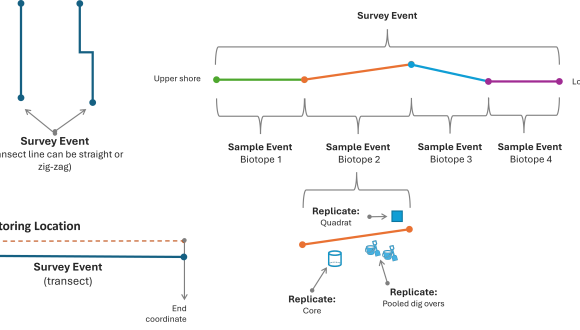
NatureScot intertidal surveys are usually conducted as part of Site Condition Monitoring. A survey con consists of one or more transects usually located across a coastline from the top to lower shore. Each transect is treated as a separate Survey Event with an associated Location. Each Survey Event will have a Linestring WKT, as “WGS 84 Geometry (Line)”, based on the start and end coordinate for the transect. The whole transect may not be a straight line, as it may zig-zag to avoid physical obstructions.
Monitoring Location
Each Survey Event must be associated with a specific Location, with the Location Type as “Monitoring site”. The Location must be represented by a Linestring WKT geometry based on the start and end coordinate of the transect, as a “WGS 84 Geometry (Line)”. This is particularly important as it allows recording of the Start and End coordinates which is essential for repeat monitoring visits.
The Linestring WKT for the Location should be the same (or very similar) to the geometry of the Survey Event.
Each Survey Event (transect) should be split into a series of Sample Events representing observed changes of habitat or biotope. Each Sample Event will have a Linestring WKT geometry based on the start and end coordinate of the transect section, representing a single habitat type using a “WGS 84 Geometry (Line)”.
Each Sample Event will have one, or occasionally more, associated Biotope Occurrences, and where data is available a Physical entry to describe the habitat observed. The number and distribution of Sample Events within the transect may change between repeat monitoring surveys, as the shore profile and habitats present may be dynamic.
Within each Sample Event, data sampling is undertaken at a position deemed to be representative of the transect portion, usually a core, quadrat, and dig over, and can be taken in relatively close proximity to each other. Each of these sampling techniques are treated as individual Replicates and assigned single Point WKT geometry, as a “WGS 84 Geometry (Point)”. It’s possible for Replicates with different survey methods within the same Sample Event. Individual deployments of the same sampling method at the same location can be ‘pooled’ into a single Replicate where appropriate, please seek advice from the Nominated Officer. Each Replicate has associated Taxon Occurrence(s) to record observed species.
Habitat polygons survey
The extent of a habitat type or biotope can be determined and mapped as a polygon area, by either walking around the extent of the habitat with a hand-held GPS, from aerial imagery such as from a drone/UAV flight or from very high-resolution satellite imagery. Here we outline how data should be structured for both methods of habitat polygon data collection.
Aerial Imagery derived habitat polygons
A Survey is defined as a project to determine habitat polygons at a given location and time. It may consist of multiple drone/UAV flights or series of satellite images collected during a given time.
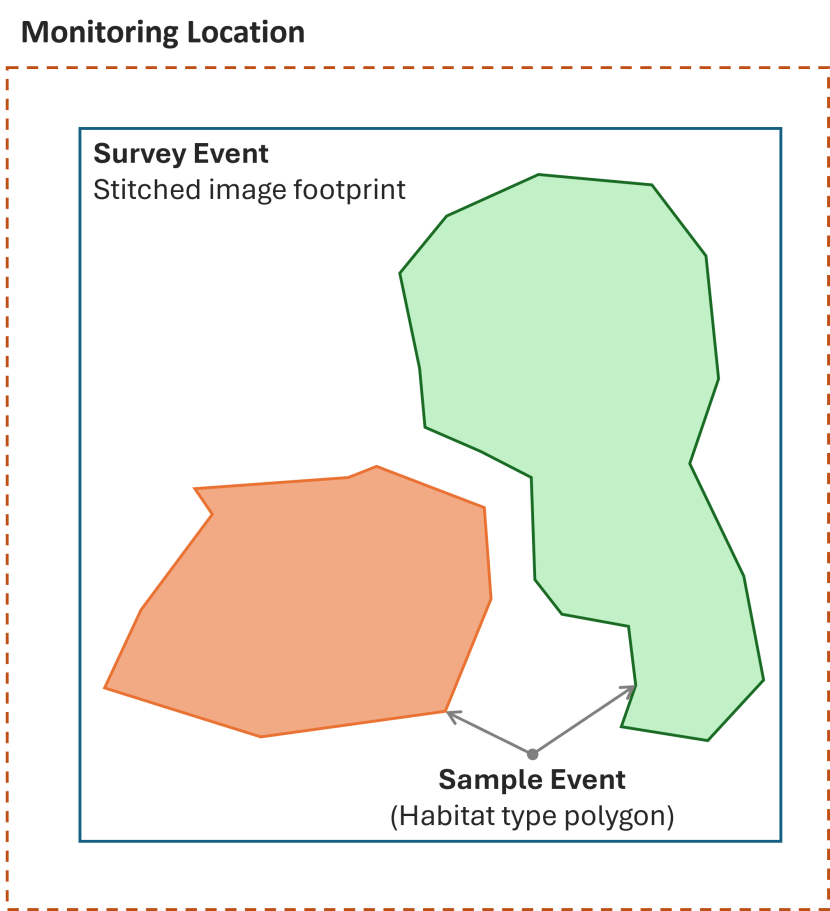
The resulting series of images are stitched together into an orthorectified geo-referenced aerial image to form a single image, or a series of images of each survey area of interest to show changes within a given time period. A Survey Event is defined by the extent of the aerial imagery and any other relevant survey components (such as planned survey areas not completed due to adverse weather conditions), and entered as Polygon WKT geometry as “WGS 84 Geometry (Polygon)”
Monitoring Location
Each Survey Event must be associated with a Location with the Location Type as “Monitoring site”. The Location is bounding box to representation area of the whole site visit entered as Polygon WKT geometry as “WGS 84 Geometry (Polygon)”. There will be multiple Survey Events (representing habitats) within the extent of the Location. This is important to enable repeat monitoring visits.
GPS Walk-around derived habitat polygons
A Survey is defined as a project to determine habitat polygons at a given location and time. It may consist of multiple site visits to determine habitat extents within a given area of interest and collected during a given time period.
A Survey Event is defined as a single walk-around survey site visit, the area of which is defined by the extent of the total surveyed area and entered as Polygon WKT geometry as “WGS 84 Geometry (Polygon)”.
Monitoring Location
Each Survey Event must be associated with a Location with the Location Type as “Monitoring site”. The Location is bounding box to representation area of the whole site visit entered as Polygon WKT geometry as “WGS 84 Geometry (Polygon)”. There will be multiple Survey Events (representing habitats) within the extent of the Location. This is important to enable repeat monitoring visits.
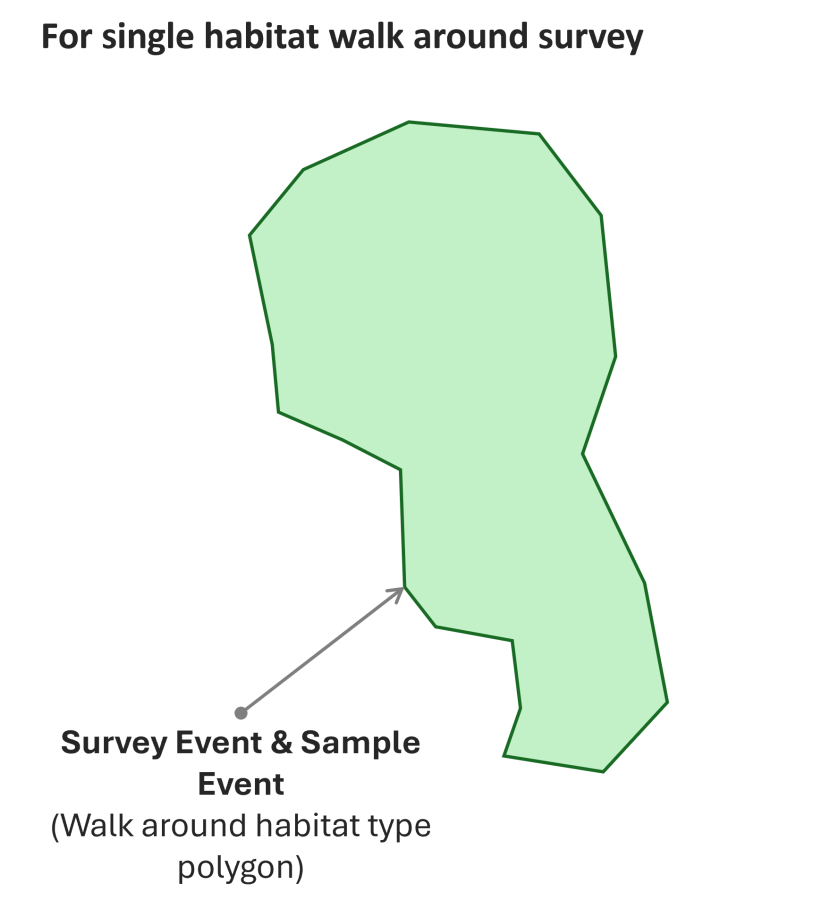
The boundary of a specific habitat or biotope type is walked around with a hand-held GPS to create a polygon. Each polygon representing a habitat or biotope type is treated as a Sample Event.
Agreement should be reached with the Nominated Officer as to minimum habitat size based on accepted physiographic definitions to ensure consistency through project. It is expected that there will be no overlap between habitat polygons, nor should there be any unintentional gaps between polygons. Polygons should be topologically clean, free of dangles, switchbacks, knots, loops, overshoots, and undershoots, slivers and other digitising errors.
Each Sample Event should have related Biotope Occurrence(s) reflecting the biotope(s) observed. Where more than one biotope is present (such as a biotope mosaic) these should be specified by stating the Percentage Composition of the Biotope, which must total 100% coverage across all Biotope Occurrences within that Sample Event, e.g. 70% LS.LBR.LMus and 30% LS.LSa.
Dutch Wand Blue mussel survey
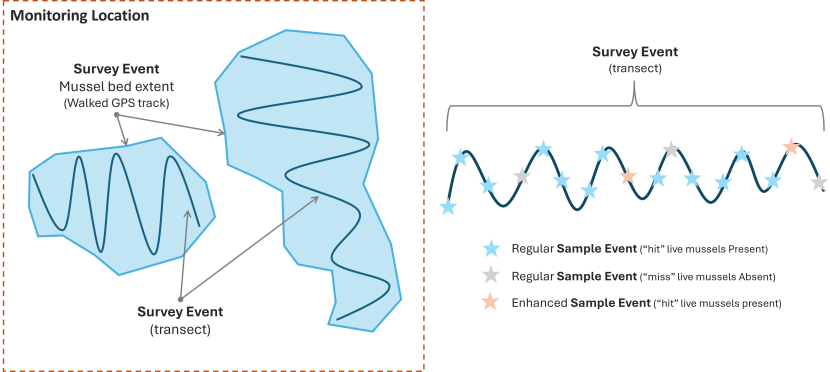
The Dutch Wand methodology is used to survey blue mussel beds with data collected from one or more survey areas. A Survey is considered a single site visit at a defined Location or Monitoring Site.
Monitoring Location
Each Survey Event must be associated with a Location with the Location Type as “Monitoring site”. The Location is bounding box to representation area of the whole site visit entered as Polygon WKT geometry as “WGS 84 Geometry (Polygon)”. There can be multiple Survey Events within the extent of the Location. This is important to enable repeat monitoring visits.
Each Survey will have multiple Survey Events, with one of two potential data collection methods;
- An extent of the mussel bed, where a surveyor walks around the extend of a mussel bed with a handheld GPS to collect a polygon area and are entered into a Survey Event as Polygon WKT geometry as “WGS 84 Geometry (Polygon)”. There are no Sample Events associated with an extent Survey Event
- One or more transects zigzag transects across a mussel bed which is walked by a surveyor carrying a “Dutch Wand”. Each transect line represented by its own Survey Event as a Linestring WKT based on the start and end coordinates of the sub-section, as “WGS 84 Geometry (Line)”.
Within each transect Survey Event, the surveyor will periodically deploy the “Dutch Wand” to collect data on the mussels. Each deployment of the Dutch wand is recorded as a Sample Event. With each Sample Event will have a single Replicate containing one or more Taxon Occurrence(s) which include species and abundance details.
Three types of Sample Events may exist within each Survey Event, which should be treated differently as follows:
- The regular Sample Event (blue star in the below diagram) collects where the mussels are live or dead, described as a “hit” or a “miss” in the methodology. Within a Taxon Occurrence a “hit” the live mussel will be recorded as Present and a “miss” the dead mussel will be recorded as Absent. The case of both live and dead mussels will be treated as a “hit” and recorded as Present. Where mussels are not identified to species level the Taxon Occurrence should be determined as “Mytilus spp.”.
- The enhanced Sample Event (orange star in the below diagram) occurs every fifth “hit” sample and collects as below. This enhanced dataset should be distinguished by an “E” suffix to the Sample Event code.
Details are recorded with the Taxon Occurrence(s) under the Dutch wand method Replicate for an enhanced Sample Event. Where specimens are collected for weight and measurements, multiple Specimen records should be created under the blue mussel Taxon Occurrence.
- The number of live mussels will be recorded as a Count value within the Taxon Occurrence entity
- Epifauna occurrences will each be recorded as Present in their own Taxon Occurrence records and qualified as ‘epifauna’.
- Predator occurrences will each be recorded as Present in their own Taxon Occurrence records and qualified as ‘predator’)
- Invasive Non-Native Species (INNS) occurrences will each be recorded as Present in their own Taxon Occurrence records and qualified as ‘INNS’.
- Live mussel length is to be recorded in millimeters in the Specimen Length custom attribute within the child Specimen entity.
- Live mussel weight is to be recorded as Live Weight custom attribute within the child Specimen entity
- Dead shell weight is to be recorded in the Shell Weight custom attribute within a child Specimen entity.
Confirmation of Taxon Determination where possible should be made before supply of final data to NatureScot and ideally before entry to Marine Recorder Online. Where it is possible to confirm taxon to species level through genetic or any other legitimate identification technique, the Taxon Occurrence should refer to Mytilus edulis, Mytilus galloprovincialis, or Mytilus trossulus. Otherwise, the Taxon Determination should refer to Mytilus spp.
Abiotic parameter data, such as salinity, pH, temperature, sediment is collected at sites across the Location area (not corresponding to Sample Events) should be submitted as separate Sample Events with a related Replicate within the Survey. Each Replicate will include the date of collection and coordinates at which the instrumentation was deployed. Each Replicate should record Physical data (Salinity, temperature and sediment) in the relevant fields. An associated Method for each data type is required, e.g. thermometer. pH data should be typed into the Notes field.
Notes on any anthropogenic disturbance observed at the site should be noted in Survey in the Survey Notes field. This guidance will be updated once the Pressures module is developed.
Random quadrat survey or Species observations
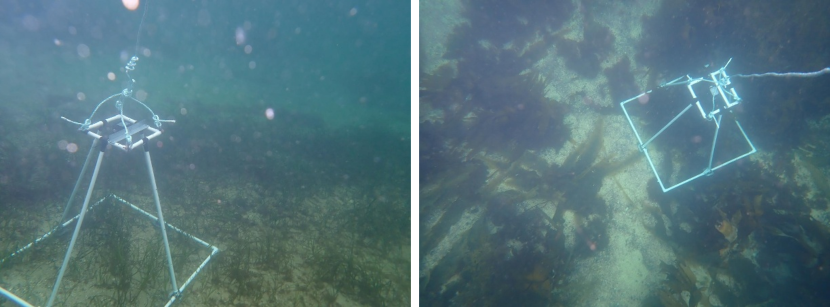
Randomly places photo quadrat
The NatureScot random quadrat survey is a drop still combined with a quadrat which conducted using a custom frame and dropped from a small vessel to record species count and habitat coverage of a fixed size area of the seabed. The quadrats are randomly located within a survey area, with the position recorded using the vessel GPS when the quadrat camera frame is dropped over the side.
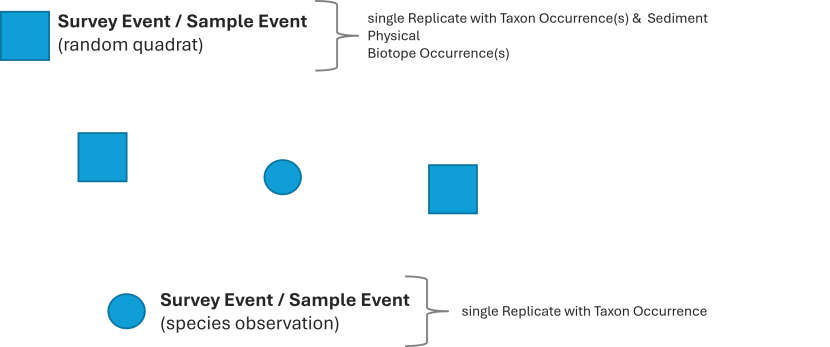
Each quadrat consists of a single Survey Event, Sample Event and Replicate, with associated Taxon Occurrence(s), Taxon Determination, Physical, Biotope Occurrence(s) and Biotope Determination. The Survey Events and Sample Events share an identical point geometry type; Point WKT with the geometry value as “WGS 84 Geometry (Point)”.
Species observation record
A species observation is a record which is collected outside of specific survey activity but has the necessary data (i.e. what, when and where). These types of data can be treated similarly, whereby species observation consists of a single Survey Event, Sample Event and Replicate, with associated Taxon Occurrence and Taxon Determination. The Survey Events and Sample Events share an identical point geometry type; Point WKT with the geometry value as “WGS 84 Geometry (Point)”.
Preparing and entering survey data
It is recommended to use the Import Templates to prepare and submit data into Marine Recorder Online. A series of standard import templates developed by JNCC for Survey Metadata and Survey Data. , as well as some specialists import templates developed by NatureScot; for example, for Community-led Monitoring.
The guidance in this document should be used in conjunction with the official MRO guide and the Knowledge Base within MRO website. The MRO Knowledge base should be consulted for an overview of the standard import templates. This document specifies the fields and data formatting required specifically for NatureScot data, where this differs from the official guidance.
The standard import templates can be accessed through MRO ‘Enter Data’ section of the website, when logged into the Management application (Enter Data).
Surveys with multiple data collection types
NatureScot aims to tender data analysis of surveys which involved a combination of different sampling methods to a single contractor; with that contractor either managing all the analysis and data entry in-house or managing through sub-contracts where necessary.
Where this is not possible, two or more contractors would be required to collaborate and coordinate data entry of data under a single Survey within MRO, under the guidance of the Nominated Officer. This would mean one contractor would be responsible for creating the necessary Survey Events and Sample Events for the survey, and share data entry of Replicate, Biotope and Physical data with the other contactors.
An outline of how this should be coordinated is outlined in the Statement of Requirements and speak to the project Nominated Officer for details.
Instructions for Delegate Editor/Contractor
The project Nominated Officer will set up the Survey for the project and will enter known data into the Survey. The Nominated Office will also assign Organisation, Project and Location to the Survey, input survey Methods and People (surveyors).
The Survey will then be delegated to a contractor or other data entry individual for input of the Survey Event, Sample Event and other child records as appropriate to the collected data. The Delegate Editor may need to edit the information within the Survey Data.
It is important that all available data be entered into the appropriate field, including for optional fields. Below is an overview of data entry requirements for NatureScot data. Seek advice from the Nominated Officer on the appropriate field for specific data to be entered where needed.
Formatting Survey data
As a contractor, it is your responsibility to enter the Survey Metadata and Survey data into Marine Recorder Online following the appropriate structure for the data collection method used. The official MRO import templates should be used for formatting and inputting data into Marine Recorder Online, the latest versions of the import templates can be downloaded from MRO management app once logged in.
Below are details on how to format data specifically for NatureScot.
Survey
Entered by the Nominated Officer and can be edited by the Delegate Editor. Below are details for fields which may need to be updated.
A Survey can include records collected using multiple sampling techniques. For example, a benthic cruise on a survey vessel might typically collect both drop-video, still images and grab sampling data, or a dive transect survey might collect data from quadrats, hand-held video and stills, hand-held cores, and MNCR recording forms. NatureScot would typically focus data into Surveys based on broad geographic area, for example a research cruise which covered both Sound of Barra and Loch Eriboll would likely be treated as two separate surveys in MRO.
| Field | Notes |
|---|---|
| MEDIN Metadata ID | NATURESCOT MANDATORY FIELD The File Identifier of the associated MEDIN Discovery Metadata record. To be entered once the MEDIN Metadata has been created in the MEDIN Metadata Editor |
Survey Abstract
| AMEND AS REQUIRED NatureScot Nominated Officer will have provided a holding value to facilitate creation of the survey delegated to contractor Brief abstract outlining the survey; this should include details of the area covered by the survey, an overview of the methods used, and work undertaken and the purpose of the survey. |
| Bibliographic Reference | NATURESCOT MANDATORY FIELD To be entered by the contractor once the report has been completed. A standard scientific citation for the report related to the survey. Use the Harvard style report citation. There is a 250-character limit for this field, where the citation is too long it can be shortened using et al. |
| Survey Type | A mandatory field for MEDIN. All NatureScot surveys are entered with the same term (‘Benthic Survey’) by the Nominated Officer |
| Survey Platform Name | NATURESCOT MANDATORY FIELD The name of the platform used during the survey. Select from the dropdown.
|
| Survey Platform identifier | COMPLETE WHERE APPLICABLE IMO of the survey platform where applicable. Example: IMO9251107
|
| Survey notes | Further notes related to the survey. |
| Specimens Held By | COMPLETE WHERE APPLICABLE Organisation holding the voucher specimens, where relevant. Voucher specimens should be being supplied to the National Museum of Scotland where appropriate. |
| Photographs Held By | COMPLETE WHERE APPLICABLE The entity or organisation holding the original survey imagery data. Example: NatureScot |
| Video Held By | COMPLETE WHERE APPLICABLE The entity or organisation holding the original survey video data. Example: NatureScot |
| Survey Quality | Generalised indication of the quality of the survey Select from the drop down |
| QC Description | COMPLETE WHERE APPLICABLE Enter a free text description of quality control procedures undertaken as part of the survey and subsequent data analysis. NatureScot Nominated officer will amend content to reflect additional quality assurance undertaken on receipt of data. |
| QC Protocol Reference | COMPLETE WHERE APPLICABLE Complete where specific protocols were used for quality assurance. Enter an online location or citation for specific protocol(s) used to ensure the quality of the survey quality control. |
| Time Surveying | Do not enter |
| Effort | Do not enter |
| Number Surveyors | Do not enter |
| Number Volunteers | Only used for community monitoring projects. |
Location
As instructed within the project Statement of Requirements and as advised by the Nominated Officer, using existing locations where available, or entering new locations as Shared Data where needed.
Method
A Method record details the type of sampling device or data collection protocol used during a survey. Every Survey and Replicate must be associated with a Method; Surveys can have multiple methods, which are then in term associated with one Replicate; for example, a cruise may deploy day grabs and drop-down video with Replicates which represent each deployment of each sampling device.
Method records can only be associated with a single survey, so Method records are required to be created by the Data Editor for each survey.
| Field | Notes |
Survey
| MANDATORY FIELD
This field allows you to select the relevant Method from those defined within the Survey Name where the method was used. |
Method Name
| MANDATORY FIELD
A descriptive name of the method. |
| Protocols Used | COMPLETE WHERE APPLICABLE
Complete where a sampling method followed a protocol. |
| Method Notes | COMPLETE WHERE APPLICABLE
Complete with notes about the sampling method used, where available. Ensure this does not contain information which can be entered elsewhere. |
Sampling Device
| MANDATORY FIELD
Searchable dropdown list
Select the type of device which captured the sample itself. If your sampling device isn’t listed contact the Nominated Officer.
Examples: still image camera, day grab, human observation.
|
Sampling Device Platform
| MANDATORY FIELD
Searchable dropdown list
In the case in which a sample device is mounted on a frame or other platform, the platform itself. Example: Camera Sledge, Hamon Grab (in the case of a temperature sensor attached to the grab). |
| Device Make and Model | COMPLETE WHERE APPLICABLE
Detail any specific on the make and model of the sampling device used.
Example: camera make and model |
| Device Configuration | COMPLETE WHERE APPLICABLE
Detail any specific information on the configuration of the device used during deployment. |
| Device Calibration | COMPLETE WHERE APPLICABLE
Detail any specific information on the calibration of the device . |
| Device Length (m) | COMPLETE WHERE APPLICABLE
The length of the sampling device which is active in sampling, in metres. |
| Device Width (m) | COMPLETE WHERE APPLICABLE
The width of the sampling device, which is active in sampling, in metres. |
| Device Height (m) | COMPLETE WHERE APPLICABLE
The height of the sampling device, which is active in sampling, in metres. |
| Device Area (m²) | COMPLETE WHERE APPLICABLE
Area of the device in square meters. |
| Storage Medium | COMPLETE WHERE APPLICABLE
The storage medium used for the fixation of biological samples prior to identification. Example: 50% Formalin |
| Quadrat Columns | COMPLETE WHERE APPLICABLE
Number of columns in the quadrat/grid used for sampling. |
| Quadrat Rows | COMPLETE WHERE APPLICABLE
Number of rows in the quadrat/grid used for sampling. |
| Angular Field Of View (°) | COMPLETE WHERE APPLICABLE
Extent viewable (horizontally) from the image, in degrees, with 360 being a full panoramic image. |
| Method Reference Image ID | DO NOT COMPLETE THIS FIELD (NatureScot Nominated Officer responsibility).
NatureScot internal identifier for the reference image demonstrating the sampling method. |
| Method Reference Image URL | DO NOT COMPLETE THIS FIELD (NatureScot Nominated Officer responsibility).
Online address where a user may access the reference image demonstrating the sampling method. |
Survey Event
Complete all mandatory fields, and all optional fields where data is available.
| Field | Notes |
|---|---|
| Location | Not mandatory. NatureScot only link Survey Events and Sample Events to Locations where the survey activity is for monitoring purposes and the Location represents specific recognised monitoring boxes, with the Type entered as “Monitoring site”. In all other instances, a Location should not be associated with Survey Events or Sample Events.
Contractors will be asked to either:
Seek advice from the Nominated Officer in relation to the use of Location if not already outlined in the SOR. |
| Salinity | Do not complete, unless specifically instructed to by the Nominated Officer |
| TidalCurrents | Do not complete, unless specifically instructed to by the Nominated Officer |
| TempSurface | Do not complete, unless specifically instructed to by the Nominated Officer |
| TempBottom | Do not complete, unless specifically instructed to by the Nominated Officer |
| BiotopeReferenceImageID | Complete with unique image ID |
| BiotopeReferenceImageURL | Do not complete, this will be updated later by the Nominated Officer once the image has been archived within the DAMS. |
Sample Event
Complete all mandatory fields, and all optional fields where data is available.
| Field | Notes |
|---|---|
| CounterTimeStart | Drop-camera survey (or other form of continual data collection method) only. This should represent the start counter times for the Sample Event.
|
| CounterTimeEnd | Drop-camera survey (or other form of continual data collection method) only. This should represent the end counter times for the Sample Event.
|
ChartDepthUpper ChartDepthLower ChartDepthStart ChartDepthEnd | Complete at least one of the Chart Depth fields, completing all four is also acceptable. |
| SeabedDepthUpper | Do not complete |
| SeabedDepthLower | Do not complete |
| SeabedDepthStart | Do not complete |
| SeabedDepthEnd | Do not complete |
| DistanceTravelled | Do not complete |
| ShipSpeed | Do not complete |
| TowShape | Do not complete |
| WaypointNumber | Do not complete |
Biotope Occurrence, Determination and Determiner
Biotope classification determination should be to the JNCCv2204 biotope classification version where possible.
For Biotope Determination, where a biotope observed reasonably matches a biotope described in the latest biotope classification then the determination should be qualified as a “Certain” in the Determination confidence field. Where a determiner notes a biotope that does not fully match a classification biotope, then a biotope of best fit should be chosen and the Determination confidence set as “Uncertain”. In these instances, an additional comment would be appropriate in the Biotope Determination Notes field.
There is no requirement to make determinations at a level where the information is too scant to support the determination or where the classification simply does not fit the observed habitat. In such cases, the determination may be best done at a higher level in the classification with an explanatory comment in Biotope Determination Notes field. Where there are perceived to be significant problems in matching observed habitats to the classification biotopes, the Nominated Officer should be made aware at the earliest possible opportunity so appropriate consensual decisions on determination can be made.
Ideally the holistic examination of taxa, sediment and substratum collected during a Sample Event would indicate a single biotope. However, there may be occasions where sample indicate a different biotope (such as infaunal data and epifaunal evidence), or where at scale of survey a mosaic of biotopes exists either in the horizontal or vertical dimensions. In these cases, assignment of two (or more) Biotope Occurrences and Determinations can be justified. A note should be recorded to reflect differing infaunal and epifaunal communities and the Whole Record attribute should be left unticked and Percentage composition estimated within the Biotope Occurrence record.
Where there are perceived to be significant problems in matching observed habitats to the classification biotopes the Nominated Officer should be made aware at the earliest possible opportunity so appropriate consensual decisions on determination can be made.
Complete all mandatory fields, and all optional fields where data is available.
Below are instructions for specific fields related to Biotope occurrence and determination when entering NatureScot data.
Biotope Occurrence
| Field | Notes |
|---|---|
| BiotopeDictID | Called ‘Biotope Code’ in the web interface and entered as a GUID. The GUID is referencing the Biotope Dictionary in the Common Data. The Biotope Dictionary can be downloaded as an Excel sheet to aid generation of the correct GUID. Attempt should be made to match the observed biotope to the JNCCv2204 biotope classification version. |
| StatusOnRevisit | As ‘unassessed’. This may be updated later by NatureScot. |
| RevisitDate | Do not complete |
| RevisitSampleID | Do not complete |
| BiotopeReferenceImageID | Complete with unique image ID |
| BiotopeReferenceImageURL | Do not complete, this will be updated later by the Nominated Officer once the image has been archived within the DAMS. |
Biotope Determination
| Field | Notes |
|---|---|
| DeterminationConfidence | Where a biotope observed reasonably matches a biotope described in the latest biotope classification then the determination should be qualified as a “Certain”.
Where biotope observed does not reasonably match a classification biotope, then a biotope of best fit should be chosen and the Determination confidence set as “Uncertain”; an additional comment would be appropriate in the Biotope Determination Notes field. |
| RestrictedRecord | Set to ‘True’ for native oyster biotopes (e.g. SS.SMx.IMx.Ost) |
| IsAutodetermined | As “No” unless some form of automated determination is applied. |
| DeterminedUnderNMBAQC | Only choose “Yes” where the determination was made when following NMBAQC protocols. |
Biotope Determiner
| Field | Notes |
|---|---|
| BiotopeDeterminerStatus | Choose an appropriate status for the determiner. This will normally be as
|
Physical
Complete all mandatory fields.
NatureScot requests that data is entered to the following sections, where there is available data.
- Fields related to Surface Feature
- Fields related to Sub-zone
- Fields related to Sub-stratum
Other sections should not be entered, unless specifically instructed to do so by the project Nominated Officer.
Replicate
Complete all mandatory fields, and all optional fields where data is available.
| Field | Notes |
|---|---|
| ReplicateCompleteness | NatureScot request completion of this field. The completeness of the replicate in terms of data captured:
For further information see Hiscock (1996). Marine Nature Conservation Review: rationale and methods. Peterborough, Joint Nature Conservation Committee. (Coasts and seas of the United Kingdom. MNCR series.), page 138-139. |
| NumberPooledDeployments | Where replicates have been pooled into a single record. Enter the number of deployments of a device (e.g. grab or core) have been pooled to create replicate. |
| SpeciesReferenceImageID | Complete with unique image ID |
| SpeciesReferenceImageURL | Do not complete, this will be updated later by the Nominated Officer once the image has been archived within the DAMS. |
Taxon occurrence, Determination, Determiner and Morphology
Complete all mandatory fields, and all optional fields where data is available.
Below are instructions for specific fields related to Taxon occurrence and determination when entering NatureScot data.
Taxon Occurrence
| Field | Notes |
|---|---|
| StatusOnRevisit | As ‘unassessed’. This may be updated later by NatureScot. |
| RevisitDate | Do not complete |
| RevisitSampleID | Do not complete |
| SpeciesReferenceImageID | Complete with unique image ID |
| SpeciesReferenceImageURL | Do not complete, this will be updated later by the Nominated Officer once the image has been archived within the DAMS. |
Taxon Determination
| Field | Notes |
|---|---|
| OriginalName | Complete this field only where a determination was taken from a specified identification guide or taxa list other than Marine Species of the British Isles and Adjacent Seas (MSBIAS) |
| OriginalID | Complete this field only where a determination was taken from a specified identification guide or taxa list other than MSBIAS, and only where that identification guide or list supplies identifier values |
| OriginalIDVocab | Complete this field only where a determination was taken from a specified identification guide or taxa list other than MSBIAS |
| RestrictedRecord | Set to ‘True’ for native oyster records |
Morphology Determination
Morphology Determinations should be used to record where a taxonomic determination alone provides insufficient information or when no suitable pure taxonomic term is assignable, for example Maerl indet, Diatoms, or where NatureScot require use of CATAMI or SPONGMOR morphologies.
MRO currently offers three different morphology classifications:
- MRMOPH: non-taxonomic terms like: Maerl indet., Diatoms etc.
- CATAMIBIO: terms from the CATAMI classification scheme for scoping marine biota and substrata in underwater imagery.
- SPONGMOR: a morphology-based classification of sponges.
Example: All records of Maerl, where there has not been molecular analysis to confirm identifcation to species level (Maerl indet.), should be recorded with the Taxon Determination of ‘Rhodophyta', and a Morphology Determination of MRMOPH 'Maerl indet.'
Sediment
Complete all mandatory fields, and all optional fields where data is available.
Use of MNCR SACFOR abundance scales
The below provides additional guidance on how to determine abundance for horse mussel beds, maerl beds and flame shell beds using the MNCR SACFOR abundance scales derived from video analysis.
The current version of the SACFOR abundance scale used for both littoral and sublittoral taxa should be followed, with the exceptions outlined below.
Horse mussel beds
Horse mussel abundance should be determined using the density scale wherever possible for live mussels in the 3-15 cm size class.
The % cover scale should be avoided. This is particularly relevant where the underwater visibility is not very good and using % cover introduces a likelihood of including dead valves. This guidance is different from the generic steer provided with the MNCR / JNCC SACFOR abundance scales.
Estimated density values (number per m2) recorded as part of the video analyses should be captured for each Sample Event in Marine Recorder Online in addition to recording an overall derived SACFOR value.
Where Modiolus abundance varies considerably within a Sample Event, but not spanning more than one SACFOR abundance class this should be noted in the Taxon Data Notes field in the Taxon Occurrence entity within Marine Recorder Online. Include commentary in reporting products as appropriate. Where abundance does span multiple SACFOR abundance classes in a clear manner the data should be split into separate events.
For example the Taxon Data Notes should contain: “Modiolus modiolus abundance varies between X and Y per square meter.”
Maerl beds
Maerl SACFOR abundance should be determined using the % cover scale. It is important to capture separate % cover estimates for both live maerl and dead maerl material during the video analyses. These will not total 100% where other substrata are present.
We recognise that dead maerl is more difficult to quantify than live material as it spans a broad size range. Where practicable, the proportion of live / dead maerl material larger than 1 cm in length should be the focus of quantification.
Maerl taxon occurrences
The estimates of % live and dead maerl cover shall be recorded within the relevant Replicate; create 2 Taxon Occurrence records (both to be determined as Rhodophyta* with a Morphology Determination of MRMOPH 'Maerl indet.'), qualify one as “live”, the other as “dead” (tick the ‘dead’ tick box) and record Percent Cover of both.
Taxon determination for maerl to species rank is not possible from video footage alone. The classification of maerl species is in flux, therefore Taxon Determination should therefore be made at the higher taxonomic Phylum rank, i.e. Rhodophyta (AphiaID: 852), with of these Rhodophyta occurrences having an associated Morphology Determination using the MRMORPH morphology classification and Morphology Code: “JNCCMNCR00000908 (Maerl indet)”
Record the % proportion of live into the ‘Gravel Live Maerl (%)’ field, and dead entered into the ‘Gravel Dead Maerl (%)’ field as Substratum Coverage in the Physical entity of the parent Sample Event.
Determining Maerl biotopes
There are ongoing discussions about whether assigning a maerl biotope requires the presence of live maerl as opposed to potentially just having dead maerl. This is not explicit in the biotope classification or assorted maerl bed ‘definitions’ (OSPAR etc.). Most of our recent analyses have been undertaken on the basis of requiring a minimum % cover of live maerl (e.g. one analyst uses >10% or Frequent on the SACFOR ‘Crust/Meadow’ % scale) to qualify as a maerl biotope, with other biotopes applied to dead maerl habitats.
Our current guidance would be to follow the definition provided in the PMF review of 2018:
"Maerl beds are defined by the presence of a complex 3D structure, created by accumulations of maerl pieces. Depending on environmental conditions, beds can form as continuous carpets, patches of dense maerl on other sediments, or have a linear appearance, following the troughs or ridges of sediment waves on the seabed.
Accumulations of maerl are considered a bed where there is at least 20% coverage of dead or live maerl thalli. The 20% cover of maerl substrates has to extend over an area of at least 5 m x 5 m (whether continuous or in discrete patches / rows). Areas of the seabed where the substrate is made up of broken maerl gravel may also be considered maerl beds, albeit degraded ones, when there is at least 5% cover of live maerl material >1 cm in size. "
As long as clarity is provided in the report regarding any thresholds applied (e.g. minimum live maerl % cover and/or any use of an overall maerl substrates % cover etc.) with the detail of the %’s per each individual sample captured (in MR) then NatureScot are content that analysts apply their expertise to the biotope assignment process.
Maerl gravel made up of pieces smaller than 1 cm in length is unlikely to be structurally or functionally distinct from other non-maerl substrates and should not be recorded separately or underpin assignment to a maerl bed biotope.
Maerl biotopes derived from analysis of drop-down video data should be determined as: SS.SMp.Mrl using the JNCCv2204 Classification, to reflect that we cannot know which species is present from video footage.
Flame shell beds
Observations of % cover of flame shell (Limaria) ‘turf’ are very useful and can inform analysis of change in bed structure over time and are the only measures which it may be possible to derive from video footage alone. So, an approx. % cover of turf should be recorded where observed during the video analysis. However, this value should not be used within the SACFOR ‘turf’ scales to generate an associated SACFOR value for the species.
There is no linear relationship between Limaria abundance and turf cover. Some form of abundance value has to be recorded against the species within Marine Recorder Online to tie its presence to the associated biotope assignment.
We recommend that the estimated % cover of flame shell turf entered as a Taxon Occurrence into the ‘Percentage cover’ field, and with ‘turf’ entered in the Qualifier field. This ensure clarity that this % cover value is not directly related to ‘cover’ of the species on the seabed, and therefore it should not be used to generate an equivalent species SACFOR abundance.
Variation in levels of turf cover observed within a single Sample Event should be detailed in the Taxon Data Notes field in the Taxon Occurrence entity within Marine Recorder Online. For example, the Taxon Data Notes should contain: “Flame shell turf varies between X% and Y%.”
Likewise, a statement on turf cover may be made in the Sample Event Notes field alongside other notes relevant to the Sample Event.
For example, the Sample Event Notes could contain: “SUBSTRATE Limaria turf (90%) wvith small patches of coarse sand (10%). BIOTA.Well-formed Limaria hians bed with turf covering around 90% of seabed and supporting park of Laminaria hyperborea (C) with foliose red algal stipe flora, as well as Obelia geniculata, Gibbula cineraria (P) and Membranipora membranacea (locally C). Byssal turf incorporating stones with pink coralline encrusting algae and kelp material and supporting short red algal turf (C), hydroids (R) and Alcyonium digitatum (R). Cancer pagurus (P), Buccinum undatum (P), Aequipecten"
Details on Flame Shell abundance: Limaria densities per unit area are likely to be significantly greater for a continuous, luxuriant turf than they will be for small, scattered nests. Known densities of Limaria in Limaria beds range between approx. 30-1000/m2. These values have been obtained from turf areas only (100% cover for the sample) and represent SACFOR values of C-A on the density scale. Based on areas of known densities, 20 % cover could represent F, C or A based on the density scale (although for the vast majority of known beds would be C or A). There is currently no such thing as Superabundant Limaria (>1000 individual per m2 when using the 1-3 cm size individual category). Most Limaria beds have densities of 100-999/m2 of turf. A 10% cover of turf therefore represents at least C on the SACFOR scale. Analysts often apply a >10% cover threshold for defining the Limaria biotope and bed presence (when present over a minimum of 5 m x 5 m area etc.) but may well not assign a SACFOR abundance to the species at all, and should never do so based on the turf %-cover alone (see next bullet). This avoids inappropriate comparisons between beds.
Quality Assurance
NatureScot require that data transcription to Marine Recorder from ‘raw’ data or survey forms is 100 % accurate (allowing for correction of erroneous data on forms). NatureScot require evidence that somebody other than the individual inputting data has validated at least 10 % of records in detail. Where transcription errors occur in the 10% sampling exercise all the data entered will be re-checked and errors corrected.
Quality assurance of the data should include use of the tools available in the MRO web application, for example: Build search query, spatial views on data and the data export tools.
Responsibility for data quality rests with the Delegate Editor. NatureScot will subject supplied data to internal quality assurance processes and reserve the right to return data to the contractor where data entry has been incomplete or inaccurate. The Delegate Editor is responsible for making any necessary changes identified during the quality assurance process.
MEDIN Discovery Metadata
A MEDIN compliant discovery metadata record must be completed for each survey (note a cruise can contain more than one survey). A survey entered to Marine Recorder should always have an associated metadata record generated.
The MEDIN Discovery Metadata Editor online tool should be used to generate a metadata record and content for the survey. An account should be established set up with this online tool (using link on the login page and metadata created and edited there.
Please see the following resources:
- MEDIN metadata discovery standard (including description of elements and requirements)
- MEDIN Discovery Metadata Standard v3.1.2 Guidance Notes (full version pdf)
- MEDIN Discovery Metadata Standard v3.1.2 Guidance Notes (brief version pdf)
- MEDIN Marine Data YouTube Channel
Once completed, the metadata record should be transferred to NatureScot for quality assurance and final publication alongside the other survey outputs.
DO NOT publish the record to MEDIN or data.gov.uk.
Procedure for transferring metadata records to NatureScot
- From the "My Metadata" dashboard, open the metadata record to be transferred
- Click the "Transfer" button (at the bottom right of the page).
- Enter the Transfer ID (from #1 above) of the account to which the record should be transferred to. The NatureScot Transfer ID is d79e89e2-67b7-11f0-b793-00505695.
- Click "Transfer". You will be returned to the "My Metadata" dashboard. Records marked for transfer will appear on the list but with the addition of the transfer icon as an indicator.
- The system will send a notification to NatureScot, where the Marine Data Advisors can accept the transfer request.
It is possible to cancel a transfer while the transfer is still pending. From the "My Metadata" dashboard, open the record which has been transferred and click on the "Cancel Transfer" button at the bottom right of the page.
Submitting MRO data to NatureScot
Once entry of draft data into a Delegated survey is complete and quality assured, the Nominated Officer should be notified. The Nominated Officer will then revoke the delegation rights to the Survey and bring the data under full NatureScot custodianship.
NatureScot will undertake their own quality assurance of the data and will then either, sign off the data, or in consultation with contractor make minor corrections. In rare cases the data will be returned to the contractor where more substantive corrections need to be made.
Last updated: